
Azure VPN Gateway Configuration is a critical component of modern hybrid cloud infrastructure that enables secure, encrypted connectivity between your on-premises network and Azure Virtual Networks. Whether you’re a network engineer planning a cloud migration, a system administrator managing hybrid infrastructure, or an IT professional seeking to understand Azure networking, mastering Azure VPN Gateway Configuration is essential for building resilient, secure cloud solutions.
In today’s distributed IT environment, organizations need reliable methods to extend their on-premises networks into the cloud while maintaining security, performance, and compliance. Azure VPN Gateway Configuration provides this capability through encrypted IPsec/IKE tunnels that establish secure connections over the public internet.
This comprehensive Azure VPN Gateway Configuration guide will walk you through everything you need to know, from fundamental concepts to advanced enterprise deployments. You’ll learn the architecture, step-by-step configuration procedures, verification methods, troubleshooting techniques, and industry best practices used by enterprise organizations worldwide.
What is Azure VPN Gateway?
Azure VPN Gateway is a specific type of Virtual Network Gateway that sends encrypted traffic between your Azure Virtual Network and your on-premises location across the public internet. Each Virtual Network can have only one VPN Gateway, but you can create multiple connections to the same VPN Gateway, enabling hub-and-spoke network topologies.
The VPN Gateway consists of two or more virtual machines deployed to a special subnet called the Gateway Subnet. These VMs contain routing tables and run specific gateway services, though they are not directly configurable or accessible by administrators.
Key Components
Virtual Network Gateway: The Azure resource that provides the VPN functionality and houses the gateway VMs.
Gateway Subnet: A dedicated subnet within your Virtual Network that must be named “GatewaySubnet” for the VPN Gateway to function.
Public IP Address: Each VPN Gateway requires at least one public IP address for external connectivity.
Local Network Gateway: Represents your on-premises VPN device and network configuration in Azure.
Connection: The resource that links the Virtual Network Gateway to the Local Network Gateway, establishing the VPN tunnel.
Azure VPN Gateway Architecture
Understanding the architecture of Azure VPN Gateway is crucial for effective design and troubleshooting. The gateway operates at the network layer of the OSI model, establishing IPsec/IKE tunnels for encrypted communication.
Gateway SKUs and Performance
Azure offers multiple VPN Gateway SKUs with varying performance characteristics:
- Basic SKU: Legacy option with limited throughput, suitable only for development and testing environments
- VpnGw1, VpnGw2, VpnGw3: Standard gateway SKUs offering 650 Mbps, 1 Gbps, and 1.25 Gbps aggregate throughput respectively
- VpnGw1AZ, VpnGw2AZ, VpnGw3AZ: Zone-redundant versions providing higher availability across Azure Availability Zones
- VpnGw4, VpnGw5: High-performance SKUs supporting 5 Gbps and 10 Gbps throughput for enterprise-scale deployments
High Availability Options
Azure VPN Gateway supports multiple high availability configurations:
- Active-Standby: Default configuration where one gateway instance is active while the other remains on standby
- Active-Active: Both gateway instances actively handle traffic, doubling throughput and providing seamless failover
- Zone-Redundant Gateways: Deploy gateway instances across Availability Zones for maximum resilience against datacenter failures
Types of Azure VPN Connections
Azure VPN Gateway supports several connection types to accommodate different networking scenarios.
Site-to-Site (S2S) VPN
Connects your on-premises network to Azure over an IPsec/IKE VPN tunnel. This is the most common configuration for hybrid cloud deployments, enabling seamless integration between on-premises infrastructure and Azure resources.
Point-to-Site (P2S) VPN
Allows individual client computers to connect directly to your Azure Virtual Network. Ideal for remote workers or administrators who need secure access to Azure resources from any location.
VNet-to-VNet VPN
Establishes encrypted connections between different Azure Virtual Networks, whether in the same region or across different geographic locations. This enables secure multi-region architectures.
ExpressRoute + VPN Coexistence
Combines dedicated ExpressRoute circuits with VPN connections for redundancy, allowing VPN to serve as a backup path if the ExpressRoute connection fails.
Common Use Cases
Azure VPN Gateway addresses numerous enterprise networking requirements:
Hybrid Cloud Infrastructure
Organizations extending their on-premises datacenters into Azure use site-to-site VPN connections to maintain seamless connectivity. This enables workload migration, disaster recovery, and cloud bursting scenarios while keeping sensitive data on-premises.
Remote Office Connectivity
Businesses with multiple branch offices can establish site-to-site VPN connections from each location to Azure, creating a hub-and-spoke topology that centralizes resources and simplifies management.
Secure Remote Access
IT administrators and remote workers use point-to-site VPN connections to securely access Azure resources and on-premises systems through the Azure gateway, eliminating the need for complex firewall rules.
Multi-Region Deployments
Global organizations use VNet-to-VNet connections to link Azure resources across different regions, enabling geo-distributed applications with low-latency regional access.
Disaster Recovery Solutions
VPN connections provide secure replication paths for backup and disaster recovery solutions, ensuring business continuity without exposing sensitive data over public networks.
Lab Setup Requirements
To follow this configuration guide, you’ll need the following resources and access:
Azure Requirements
- Active Azure subscription with Contributor or Owner permissions
- Azure CLI installed (version 2.30 or higher) or access to Azure Portal
- Azure PowerShell module (optional, for PowerShell-based configuration)
- Sufficient quota for VPN Gateway resources in your target region
On-Premises Requirements
- Compatible VPN device (Cisco ASA, Cisco IOS, Fortinet, Palo Alto, pfSense, etc.)
- Administrative access to configure the VPN device
- Static public IP address for the on-premises VPN endpoint
- Knowledge of on-premises network addressing scheme
Network Requirements
- Non-overlapping IP address spaces between on-premises and Azure networks
- Ability to configure routing on both sides of the connection
- Firewall rules allowing UDP ports 500 and 4500 (IPsec/IKE traffic)
Network Topology Overview
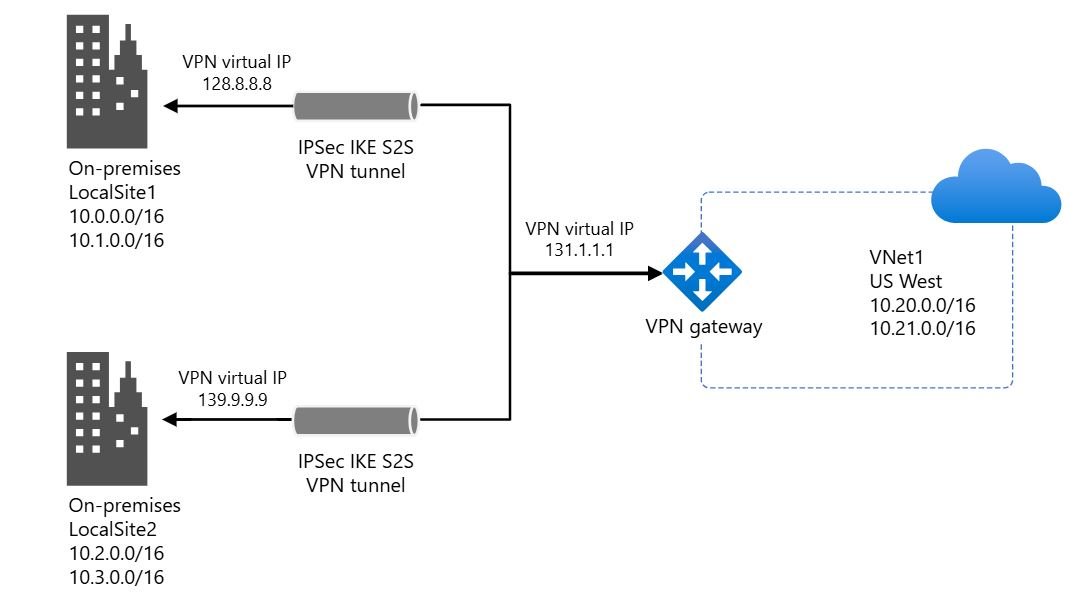
This guide uses a standard site-to-site VPN configuration with the following topology:
Azure Side Configuration
Virtual Network (VNet): 10.1.0.0/16
- Gateway Subnet: 10.1.255.0/27
- Application Subnet: 10.1.1.0/24
- Database Subnet: 10.1.2.0/24
VPN Gateway: VpnGw1 SKU with BGP enabled
Public IP: Dynamic public IP assigned by Azure
Region: East US (or your preferred region)
On-Premises Configuration
Network Range: 192.168.0.0/16
- Corporate LAN: 192.168.1.0/24
- Server Subnet: 192.168.10.0/24
- Guest Network: 192.168.100.0/24
VPN Device: Cisco IOS router or compatible device
Public IP: Your static public IP address
BGP ASN: 65001 (if using BGP)
Step-by-Step Configuration Guide
This section provides detailed instructions for configuring Azure VPN Gateway using both Azure Portal and Azure CLI methods.
Creating the Virtual Network
The first step is creating an Azure Virtual Network that will host your gateway and Azure resources.
Azure Portal Method:
- Navigate to Azure Portal and select “Create a resource”
- Search for “Virtual Network” and click Create
- Enter the required details (Resource Group, Name, Region)
- Configure address space: 10.1.0.0/16
- Create initial subnet: 10.1.1.0/24
- Review and Create
Azure CLI Method:
# Create resource group
az group create --name rg-vpn-prod --location eastus

# Create virtual network
az network vnet create
  --name vnet-azure-prod
  --resource-group rg-vpn-prod
  --address-prefix 10.1.0.0/16
  --subnet-name subnet-application
  --subnet-prefix 10.1.1.0/24
Creating the Gateway Subnet
The Gateway Subnet is a mandatory special-purpose subnet for VPN Gateway deployment.
Important Notes:
- The subnet MUST be named “GatewaySubnet” (case-sensitive)
- Minimum recommended size is /27 (32 addresses)
- Do not deploy any other resources to the Gateway Subnet
- A /27 subnet supports up to 10 tunnels on VpnGw1 SKU
Azure CLI Method:
# Create gateway subnet
az network vnet subnet create
  --name GatewaySubnet
  --resource-group rg-vpn-prod
  --vnet-name vnet-azure-prod
  --address-prefix 10.1.255.0/27
Creating the VPN Gateway
Now we’ll create the actual VPN Gateway resource. This process takes 30-45 minutes to complete.
# Create public IP for VPN Gateway
az network public-ip create
  --name pip-vpngw-prod
  --resource-group rg-vpn-prod
  --allocation-method Dynamic

# Create VPN Gateway (takes 30-45 minutes)
az network vnet-gateway create
  --name vng-azure-prod
  --resource-group rg-vpn-prod
  --vnet vnet-azure-prod
  --public-ip-addresses pip-vpngw-prod
  --gateway-type Vpn
  --vpn-type RouteBased
  --sku VpnGw1
  --asn 65515
  --no-wait
Configuring On-Premises Device
The on-premises configuration varies by device manufacturer. Below is a Cisco IOS example:
! IKEv2 Proposal
crypto ikev2 proposal azure-proposal
 encryption aes-cbc-256
 integrity sha256
 group 2
!
! IKEv2 Policy
crypto ikev2 policy azure-policy
 proposal azure-proposal
!
! IKEv2 Keyring
crypto ikev2 keyring azure-keyring
 peer azure-gateway
  address <AZURE_GATEWAY_PUBLIC_IP>
  pre-shared-key YourStrongPreSharedKey
!
! Tunnel Interface
interface Tunnel0
 description Azure Site-to-Site VPN
 ip address 192.168.255.1 255.255.255.252
 tunnel source GigabitEthernet0/0
 tunnel mode ipsec ipv4
 tunnel destination <AZURE_GATEWAY_PUBLIC_IP>
!
! Static Route
ip route 10.1.0.0 255.255.0.0 Tunnel0
Verification and Testing
After completing the configuration, verify the VPN connection status.
Azure CLI Verification
# Check VPN connection status
az network vpn-connection show
  --name cn-azure-to-onprem
  --resource-group rg-vpn-prod
  --query connectionStatus

# Check BGP peering status
az network vnet-gateway list-bgp-peer-status
  --name vng-azure-prod
  --resource-group rg-vpn-prod
On-Premises Verification (Cisco)
! Check IKEv2 SA status
show crypto ikev2 sa

! Check IPsec SA status
show crypto ipsec sa

! Verify tunnel interface
show interface Tunnel0

! Check BGP neighbor status
show ip bgp summary
Connectivity Testing
# Test from Azure VM to on-premises
ping 192.168.1.10

# Test from on-premises to Azure
ping 10.1.1.10

# Trace route to verify path
traceroute 10.1.1.10
Troubleshooting Common Issues
Issue 1: VPN Connection Not Establishing
Symptoms: Connection remains in “Connecting” state
Common Causes:
- Pre-shared key mismatch
- Incorrect IKE/IPsec parameters
- Firewall blocking UDP 500/4500
- Incorrect public IP address
Resolution:
- Verify pre-shared keys match exactly (case-sensitive)
- Confirm public IP addresses are correct
- Check firewall rules allow UDP 500 and 4500
- Ensure IKE/IPsec proposals match Azure requirements
Issue 2: BGP Peering Not Establishing
Symptoms: VPN tunnel up but BGP neighbor shows “Idle”
Resolution:
- Verify BGP peer IP addresses match on both sides
- Ensure correct ASN configuration (Azure default: 65515)
- Confirm tunnel interface is up
- Verify eBGP multihop is configured
Issue 3: Intermittent Connectivity
Symptoms: High packet loss or periodic disconnections
Resolution:
- Adjust MTU to 1400 bytes or lower
- Configure TCP MSS clamping to 1360
- Increase DPD timeout to 45 seconds
- Check gateway bandwidth metrics
Security Best Practices
Pre-Shared Key Management
- Use minimum 32 characters with mixed case, numbers, symbols
- Generate using cryptographically secure random generators
- Never reuse keys across different connections
- Rotate keys every 90-180 days
- Store keys securely in Azure Key Vault
Encryption Standards
Recommended Parameters:
- IKE Encryption: AES-256-GCM or AES-256-CBC
- IKE Integrity: SHA-256 or SHA-384
- DH Group: 14 (2048-bit) or higher
- IPsec Encryption: AES-256-GCM
- PFS Group: 14, 24, or ECP256
Avoid Legacy Algorithms:
- Do not use DES, 3DES, or MD5
- Use IKEv2 exclusively
- Avoid DH groups 1, 2, and 5
Network Segmentation
Implement micro-segmentation using NSGs to restrict traffic to required ports only. Use Azure Bastion instead of exposing RDP/SSH directly.
Monitoring and Alerting
Enable diagnostic logging for VPN Gateway and create security alerts for connection failures, authentication issues, and unusual traffic patterns.
Performance Optimization
Gateway SKU Selection
- VpnGw1: Small deployments with <100 users (650 Mbps)
- VpnGw2: Medium workloads with 100-300 users (1 Gbps)
- VpnGw3/VpnGw4/VpnGw5: Enterprise deployments (1.25-10 Gbps)
Active-Active Configuration
Implement active-active gateways to:
- Double aggregate throughput
- Achieve zero downtime during maintenance
- Enable automatic failover
- Provide load balancing across tunnels
Connection Optimization
- Enable BGP for dynamic routing
- Use route-based VPN for better scalability
- Implement QoS for latency-sensitive traffic
- Configure TCP MSS clamping to prevent fragmentation
Cost Optimization Strategies
Right-Sizing Gateway SKU
Start with VpnGw1 and monitor utilization. Upgrade only when consistently exceeding 70% bandwidth capacity.
Data Transfer Optimization
- Implement data deduplication before transfer
- Use Azure File Sync for file sharing
- Schedule bulk transfers during off-peak hours
- Compress data before transmission
- Cache frequently accessed data on-premises
Shared Gateway Architecture
For multi-VNet deployments, use hub-and-spoke topology with a single VPN Gateway to reduce costs.
Reserved Capacity
Consider Azure Reservations for long-term deployments:
- 1-year reservation: 20% savings
- 3-year reservation: 40% savings
Conclusion
Azure VPN Gateway provides a robust, secure, and cost-effective solution for hybrid cloud connectivity. This comprehensive guide covered fundamental concepts, detailed configuration procedures, verification methods, and enterprise best practices.
Key Takeaways
Planning is Critical: Proper address space planning, gateway SKU selection, and routing design prevent costly reconfiguration.
Security Must Be Layered: Implement defense-in-depth with NSGs, Azure Firewall, strong authentication, and comprehensive monitoring.
BGP Enables Scalability: Dynamic routing with BGP simplifies management and provides faster convergence.
Monitor Proactively: Implement comprehensive logging and alerting to identify issues before they impact users.
Test Thoroughly: Verify connectivity, performance, and failover scenarios before production deployment.
Professional IT Support Services
Need expert assistance with your Azure networking infrastructure? I provide professional IT consulting and implementation services for organizations across Pakistan and internationally.
Services Offered
Azure Networking Design & Implementation
- Virtual Network architecture and planning
- VPN Gateway configuration and optimization
- Hub-and-spoke topology design
- Network security group implementation
VPN Solutions
- Site-to-site VPN setup and troubleshooting
- Point-to-site VPN for remote access
- Multi-site VPN configurations
- High-availability VPN deployments
Cisco Routing & Switching
- Router and switch configuration
- BGP routing protocol implementation
- Network troubleshooting and optimization
Windows Server Infrastructure
- Active Directory deployment
- DNS and DHCP configuration
- Hyper-V virtualization
Why Choose My Services?
- Certified Expertise: CCNA certified with hands-on Azure and Windows Server experience
- Real-World Experience: Proven track record across financial services, healthcare, and technology sectors
- 24/7 Support: Remote support available with flexible scheduling
- Cost-Effective Solutions: Balanced security, performance, and budget
Contact Information
- Email: itexpert@navedalam.com
- WhatsApp: +92 311 935 8005
- Website: https://navedalam.com
- Location: Pakistan (Remote support worldwide)
About the Author
Naveed Alam is a certified Network & Cloud Engineer specializing in enterprise networking, Azure cloud infrastructure, and hybrid connectivity solutions.
Certifications:
- Cisco Certified Network Associate (CCNA)
- Microsoft Azure Fundamentals (AZ-900)
- CompTIA A+
Expertise:
- Azure Virtual Networks and VPN Gateway
- Cisco IOS and ASA configuration
- Site-to-site and point-to-site VPN solutions
- BGP routing protocol implementation
- Network security and compliance
Connect:
- LinkedIn: linkedin.com/in/navedalam
- Website: navedalam.com
- Email: itexpert@navedalam.com