
Remote IT support services are no longer a luxury reserved for large enterprises — they are the fastest, most cost-effective way for businesses of any size to resolve technical problems without waiting for an engineer to show up on-site. Whether your VPN has stopped connecting, your Windows Server is throwing errors, or your Microsoft 365 email has gone down, professional remote IT support services get you back online in minutes, not days.
For small businesses managing limited IT budgets, and for enterprises needing specialist expertise on demand, remote IT support services deliver the same quality of technical resolution as an in-house team — at a fraction of the cost. This page covers everything you need to know: what remote IT support includes, how it works, what problems it solves, and why businesses across Pakistan and internationally choose navedalam.com for their remote technical support needs.
Written by Naveed Alam — Network & Cloud Engineer specializing in Cisco networking, Azure cloud, VPN deployment, and Windows Server administration. CCNA, AZ-900, and CompTIA A+ certified with 8+ years of enterprise IT experience.
Table of Contents
- Why Remote IT Support Services Matter
- Types of Remote IT Support Services
- Key Services Offered
- Common IT Problems Solved Remotely
- How Remote IT Support Works — Step by Step
- Benefits for Businesses
- Real-World Case Study
- Troubleshooting Common IT Issues
- Best Practices
- Security Considerations
- Why Choose Naveed Alam IT Services
- Conclusion
- Get Help Now
Why Remote IT Support Services Matter
Every hour of IT downtime costs money. A study by Gartner found that unplanned infrastructure downtime costs enterprises an average of $5,600 per minute. For small businesses, even a two-hour outage can mean lost sales, missed client deadlines, and damaged reputation.
Traditional on-site IT support is slow. Scheduling a technician visit means waiting hours — sometimes days — while your business bleeds productivity. Remote IT support services eliminate that wait entirely. A certified engineer can connect to your systems within minutes, diagnose the root cause, and apply the fix while you watch.
The shift to cloud infrastructure, remote workforces, and SaaS applications has also made geography irrelevant to most IT problems. Your network, servers, and cloud services can be managed, monitored, and repaired remotely just as effectively as from the server room. For businesses in Pakistan and across the region, this opens access to enterprise-grade technical expertise that was previously unavailable locally or prohibitively expensive.
Types of Remote IT Support Services
Not all remote IT support is the same. Understanding the different models helps you choose the right fit for your business.
Break-Fix Support: You call when something breaks, an engineer fixes it, and you pay for the time used. Ideal for businesses with infrequent IT issues or specific one-time projects like VPN configuration or server migration.
Managed IT Support Services: A proactive, ongoing model where your IT infrastructure is monitored 24/7, patches are applied on schedule, and problems are often resolved before users notice them. Best for businesses that need consistent uptime guarantees.
IT Helpdesk Support Services: User-facing support for day-to-day issues — password resets, software installations, email problems, printer errors. Typically delivered via ticketing system, chat, or phone.
Project-Based Remote Technical Support: Specialized engagements for defined projects: Azure cloud migration, Microsoft 365 deployment, VPN infrastructure rollout, or Active Directory restructuring. Fixed scope, fixed timeline, clear deliverables.
24/7 IT Support Services: Round-the-clock coverage for businesses that operate across time zones or cannot afford any downtime window. Critical for e-commerce, healthcare, and financial services environments.
Key Services Offered
Network Troubleshooting and Support
Slow network? Intermittent connectivity? Devices dropping off the network? Remote network support services cover full diagnostics — from switch configuration and VLAN issues to routing problems and bandwidth analysis. Using remote access tools and your network management systems, most network issues are resolved without a site visit.
Includes: Cisco switch and router configuration, VLAN setup and troubleshooting, firewall rule review, bandwidth monitoring, QoS configuration, and LAN/WAN performance optimization.
VPN Configuration Services
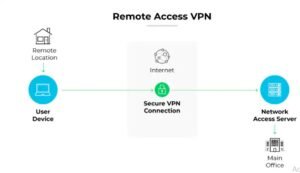
VPN issues are among the most common and disruptive problems businesses face with remote workforces. VPN configuration services cover full design, deployment, and troubleshooting for:
- Cisco AnyConnect (IKEv2 and SSL VPN)
- Azure VPN Gateway (site-to-site and point-to-site)
- FortiClient and Fortinet SSL VPN
- WireGuard and OpenVPN
- Windows built-in VPN (L2TP/IKEv2)
If your VPN is not connecting, dropping sessions, or blocking internet access after connecting, this is resolved remotely in most cases within 1–2 hours.
Azure Cloud Remote Support Services
Azure cloud support covers everything from VM deployment and networking to cost optimization and security hardening. Services include:
- Azure Virtual Machine setup, troubleshooting, and recovery
- Azure VPN Gateway configuration and diagnostics
- Azure Active Directory and Entra ID management
- Azure networking (VNets, NSGs, peering, load balancers)
- Azure Backup configuration and recovery
- Azure cost review and right-sizing
Microsoft 365 Remote Support Services
Microsoft 365 support covers the full suite of productivity tools your business depends on daily:
- Exchange Online email setup, migration, and troubleshooting
- Exchange Online Protection (EOP) anti-spam and anti-phishing configuration
- SPF, DKIM, and DMARC implementation
- Teams and SharePoint administration
- Microsoft 365 license management
- Conditional Access and MFA configuration
- Google Workspace to Microsoft 365 migration
Windows Server and Active Directory Support Services
Windows Server forms the backbone of most business networks. Remote server support services cover:
- Windows Server 2016/2019/2022 installation and configuration
- Active Directory setup, replication troubleshooting, and health monitoring
- Group Policy configuration and troubleshooting
- DNS and DHCP server management
- Remote Desktop Services (RDS/RDP) setup and troubleshooting
- Windows Server Backup and recovery
- Hyper-V virtualization management
Firewall Configuration Support
A misconfigured firewall is both a security risk and a connectivity problem. Firewall support covers Cisco ASA, Fortinet FortiGate, pfSense, and Windows Firewall — including rule review, NAT configuration, VPN policy setup, and security hardening audits.
Common IT Problems Solved Remotely
These are the most frequent issues businesses contact me to resolve — and in most cases, they’re fixed within the same session:
- Fix network issues remotely: Devices can’t reach the internet, DNS stops resolving, switches dropping ports
- VPN not connecting: Tunnel won’t establish, authentication failing, sessions dropping every few hours
- Remote desktop not working fix: RDP refusing connections, black screen after login, NLA authentication errors
- Slow network troubleshooting: Bandwidth saturation, misconfigured QoS, spanning tree loops, rogue DHCP servers
- Email not working IT support: Mail flow stopped, spam flooding inboxes, DMARC/SPF failures, email going to junk
- Azure VM not starting: Boot failures, disk attachment errors, allocation failures after platform maintenance
- Active Directory replication failures: Users can’t log in, GPOs not applying, domain controller sync errors
- Microsoft 365 login issues: MFA problems, Conditional Access blocking access, license assignment errors
How Remote IT Support Works — Step by Step
The process is straightforward and designed to minimize disruption to your business:
- Contact: Reach out via email, WhatsApp, or the website contact form. Describe your issue briefly — what’s happening, when it started, and what you’ve already tried.
- Assessment: Within 30 minutes during business hours (or immediately for emergency support), I’ll review your issue and confirm whether it can be resolved remotely, the estimated time to fix, and the cost.
- Secure Remote Access: We connect using industry-standard remote access tools — AnyDesk, TeamViewer, or RDP — with your explicit permission. For server-level access, SSH or Azure Bastion is used. All sessions are encrypted and visible to you throughout.
- Diagnosis: I run systematic diagnostics to identify the root cause — not just the symptom. This is what separates a proper fix from a temporary workaround that breaks again next week.
- Resolution: The fix is applied step by step. I explain what I’m doing and why at each stage so your team learns and can handle similar issues independently in future.
- Verification: After the fix, I verify the solution works end-to-end — testing connectivity, checking logs, confirming services are running — before closing the session.
- Documentation: A written summary of what was found, what was fixed, and any preventive recommendations is provided after every session.
Benefits of Remote IT Support Services for Businesses
Significant Cost Savings
Hiring a full-time senior network engineer costs $60,000–$120,000+ per year in Western markets, and still leaves gaps in specialized expertise. Outsourced IT support gives you access to certified expertise — Cisco, Azure, Microsoft — on demand, for a fraction of that cost. For businesses in Pakistan, affordable remote IT support services provide enterprise-grade technical resolution at local market rates.
24/7 IT Support Services
IT problems don’t follow business hours. A server crash at 2 AM, a VPN outage before an early morning board meeting, email going down before a client pitch — these happen. 24/7 remote IT support for companies ensures there’s always someone available to respond, diagnose, and fix critical issues regardless of when they occur.
Faster Resolution Times
On-site support means scheduling, travel, and delays. Remote support means connection in minutes. For most network, server, and cloud issues, remote resolution is not just faster — it’s equally effective. The average remote session resolves the reported issue in under 2 hours.
Access to Specialist Expertise
A small business IT team can’t realistically maintain deep expertise in Cisco networking, Azure cloud, Active Directory, Microsoft 365 security, and VPN infrastructure simultaneously. Remote IT support services give you access to specialists in each area without the overhead of hiring them full-time.
Scalability
As your business grows, your IT support scales with it — more users, more devices, more cloud services — without the lag of recruitment cycles. Managed IT support services adapt to your changing needs on short notice.
Proactive Issue Prevention
Beyond fixing problems, managed remote support includes monitoring that catches issues before they escalate: disk space running out, replication lag growing, certificate expiry approaching, bandwidth nearing capacity. Prevention is always cheaper than emergency recovery.
Real-World Case Study: E-Commerce Business, 45 Employees
Situation: A Lahore-based e-commerce company contacted me after their entire team lost internet access following a router firmware update. Their Cisco router had reset to factory defaults, wiping all NAT rules, VLAN configurations, and the site-to-site VPN to their payment gateway provider. The business was effectively offline during their peak sales period.
Resolution: Connected remotely via the router’s out-of-band management console within 20 minutes of the initial contact. Rebuilt the complete router configuration from a documented backup — VLANs, NAT, ACLs, and VPN — in 90 minutes. Verified payment gateway connectivity, internet access for all 45 users, and email flow before closing the session.
Result: Business fully operational within 2 hours of the outage starting. Total cost: one remote support session fee. An on-site engineer would have taken 4–6 hours just to arrive.
Preventive measures added: Automated configuration backup to cloud storage, firmware update testing procedure, and 24/7 monitoring alert for WAN connectivity loss.
Troubleshooting Common IT Issues
Issue 1: VPN Not Connecting
Symptoms: VPN client shows “Connection failed” or “Authentication error”; tunnel never establishes; users can’t reach corporate resources from home.
Common Causes: ISP blocking UDP 500/4500 ports; IPsec parameter mismatch; expired certificates; incorrect pre-shared key; firewall rules changed.
Fix:
- Test port reachability:
Test-NetConnection -ComputerName vpn.company.com -Port 4500 - Verify gateway status and provisioning state in Azure or on-premises
- Compare IPsec parameters (encryption, DH group, SA lifetime) on both sides
- Check pre-shared key matches exactly on both gateway and client
- Review firewall rules for UDP 500, 4500, and ESP protocol
Issue 2: Remote Desktop Not Working
Symptoms: RDP shows “Can’t connect to remote computer”; connection times out; black screen after login.
Common Causes: Windows Firewall blocking port 3389; Remote Desktop Services (TermService) stopped; Group Policy denying RDP access; NLA mismatch.
Fix:
- Test port:
Test-NetConnection -ComputerName [server-IP] -Port 3389 - Check service:
Get-Service TermService | Select Status, StartType - Enable firewall rule:
Enable-NetFirewallRule -DisplayGroup "Remote Desktop" - Run
gpresult /h C:gpresult.htmland check for GPO blocking RDP
Issue 3: Slow Network
Symptoms: File transfers crawling, video calls dropping, websites loading slowly, users complaining of general sluggishness.
Common Causes: Bandwidth saturation from a rogue device or application, spanning tree loop, misconfigured QoS, rogue DHCP server, failing switch port.
Fix:
- Check bandwidth utilization on the router/firewall (top talkers by IP)
- Run
show interfaceson Cisco switches — look for high error counters or CRC errors - Check for duplicate IP/DHCP conflicts with
arp -a - Review QoS policies and traffic shaping rules
- Test with a direct cable connection to rule out Wi-Fi issues
Issue 4: Email Not Working
Symptoms: Emails not sending or receiving, mail going to spam, NDR (Non-Delivery Report) errors, external senders can’t reach your domain.
Common Causes: SPF/DKIM/DMARC misconfiguration, MX record error, Exchange Online Protection policy issue, mailbox quota exceeded, connector misconfiguration.
Fix:
- Check MX records:
nslookup -type=MX yourdomain.com - Verify SPF:
nslookup -type=TXT yourdomain.com— should includespf.protection.outlook.com - Run message trace in Exchange Admin Center to find where delivery is failing
- Review EOP anti-spam policy settings in Microsoft 365 Defender portal
Issue 5: Azure VM Not Starting
Symptoms: VM stuck in “Starting” state, “AllocationFailed” error, VM unreachable after Azure maintenance.
Fix:
- Check Azure Activity Log for AllocationFailed or platform errors
- Review Boot Diagnostics screenshot in Azure portal
- Deallocate and resize the VM to hit a different allocation pool:
az vm resize --size Standard_D4s_v5 - Use Serial Console for OS-level diagnostics if the VM boots but RDP/SSH fails
Best Practices for Remote IT Support
- Document everything: Maintain up-to-date network diagrams, IP address tables, device credentials (in a password vault), and configuration backups. Half the time lost during incidents is spent figuring out “how was this configured?”
- Automate configuration backups: Every router, switch, firewall, and server should have its configuration backed up automatically — daily for critical devices, weekly for others.
- Enable monitoring before problems occur: Don’t wait for users to report issues. Deploy monitoring (PRTG, Zabbix, Azure Monitor) with alerts for connectivity loss, high CPU, low disk space, and certificate expiry.
- Use secure remote access tools: Always use encrypted, audited remote access — AnyDesk, TeamViewer with 2FA, or VPN + RDP. Never share credentials over unencrypted channels.
- Keep systems patched: Unpatched systems are the #1 vector for ransomware and security breaches. Schedule and test patches monthly — don’t apply to production without testing first.
- Implement MFA everywhere: Multi-factor authentication should be mandatory for VPN access, Microsoft 365, Azure portal, and any admin console.
- Maintain an incident response runbook: For each critical system, document the step-by-step recovery procedure. This reduces panic and speeds resolution when things go wrong at 2 AM.
- Test your backups: A backup you’ve never tested is just a hope. Schedule quarterly restoration tests for critical servers and cloud workloads.
- Review firewall and access rules quarterly: Rules accumulate. Remove rules that are no longer needed and tighten overly permissive entries.
- Maintain out-of-band access: Every critical device should have a fallback management method — IPMI/iDRAC for servers, out-of-band management for routers, Azure Serial Console for cloud VMs.
Security Considerations for Remote IT Support
Allowing remote access to your systems is a significant trust decision. Here’s how to do it safely:
Always verify the engineer’s identity before granting access. Use a formal engagement process — email confirmation, signed scope of work, and agreed-upon access tools — not ad-hoc connections from unknown sources.
Use least-privilege access. Don’t hand over domain administrator credentials for every task. Create a dedicated support account with only the permissions needed for the specific engagement. Revoke it when the session ends.
Record and audit all remote sessions. Many remote access tools (AnyDesk, TeamViewer, ConnectWise) support session recording. Enable this so you have an audit trail of exactly what was done during each support session.
Never share credentials over unencrypted channels. WhatsApp is acceptable for general communication but passwords and access keys should be shared via a password manager share link or encrypted email — never plain text in a chat.
Enable MFA on all remote access methods. VPN, RDP, Azure portal, and any remote support tool should require multi-factor authentication before connection is permitted.
Review and revoke access after every engagement. Temporary accounts should be disabled, remote access tool sessions should be ended, and VPN credentials should be reset after project completion.
Why Choose Naveed Alam IT Services
There are many options for remote IT support. Here’s what makes navedalam.com different:
Certified expertise across the stack. Most IT support providers are generalists. I specialize in the areas where most business IT problems actually occur: Cisco networking, Azure cloud, Microsoft 365, VPN infrastructure, and Windows Server. CCNA, AZ-900, and CompTIA A+ certified with 8+ years of hands-on enterprise experience.
Real fixes, not workarounds. I diagnose root causes, not symptoms. Every fix is documented and explained so your team understands what happened and can prevent it from recurring — not just patch it until it breaks again.
Transparent communication. You know what I’m doing, why I’m doing it, and what it costs before the work starts. No surprise invoices, no scope creep, no black-box fixes.
Available when you need it. Emergency support is available outside business hours for critical outages. Because IT problems don’t care what time it is.
Serving Pakistan and international clients. Based in Pakistan with the expertise and tools to serve clients worldwide via remote support. For businesses seeking IT support services in Pakistan — including remote IT support services in Islamabad, Lahore, Karachi, and across the country — and for international clients requiring specialized Cisco, Azure, or Microsoft 365 expertise, I provide the same quality of service regardless of your location.
Knowledge transfer included. After every engagement, your team learns something. I explain what broke, why it broke, and how to prevent it. This is what separates consulting from dependency.
Conclusion
Remote IT support services give your business access to certified technical expertise — faster, more affordably, and more flexibly than traditional on-site support ever could. Whether you need a one-time fix for a VPN that won’t connect, ongoing managed IT support for your entire infrastructure, or specialist Azure and Microsoft 365 expertise for a cloud migration, professional remote technical support services deliver results without the overhead of in-house hiring or the delays of on-site visits.
For businesses in Pakistan and internationally, navedalam.com provides reliable, certified, and transparent remote IT support services that solve real problems — network outages, server failures, VPN issues, email problems, and cloud infrastructure challenges — with the speed and expertise your business deserves.
Don’t let an IT problem cost you another hour of downtime. Get expert help today.
Get Help Now — Contact Naveed Alam IT Services
Ready to resolve your IT issue or discuss ongoing support for your business? Reach out through any of the following:
- Email: itexpert@navedalam.com
- WhatsApp: +92 311 935 8005
- Website: navedalam.com/contact
Response time: Within 30 minutes during business hours. Emergency support available 24/7 for critical outages.
Free 30-minute consultation available for new clients — describe your issue and receive an honest assessment of what’s causing it and how to fix it, before any commitment.
About the Author
Naveed Alam is a Network & Cloud Engineer based in Pakistan, specializing in Cisco networking, Azure cloud infrastructure, VPN deployment, and Windows Server administration. With 8+ years of hands-on enterprise experience and certifications including CCNA, Microsoft Azure Fundamentals (AZ-900), and CompTIA A+, Naveed has delivered IT infrastructure projects and remote support engagements for businesses ranging from 10-person startups to 1,000+ user enterprises across Pakistan and internationally.