
Introduction
Getting Cisco AnyConnect working correctly — with proper split tunneling, posture checks, and seamless reconnection — is one of those skills that separates a solid network engineer from someone who just got it working “somehow.” I’ve deployed AnyConnect for environments ranging from 30-user offices to a 12-branch regional bank, and the same pain points come up every time: NAT exemption misconfiguration, split-tunnel ACLs that miss a subnet, and group policies that don’t match what the security team actually wants.
This guide covers end-to-end remote access VPN configuration on both Cisco ASA (AnyConnect IKEv2 and SSL WebVPN) and Cisco IOS (FlexVPN). Every command includes an explanation of what it does, followed by troubleshooting for the five most common issues and security best practices that meet enterprise compliance requirements in 2026.
Table of Contents
- Why Remote Access VPN Matters
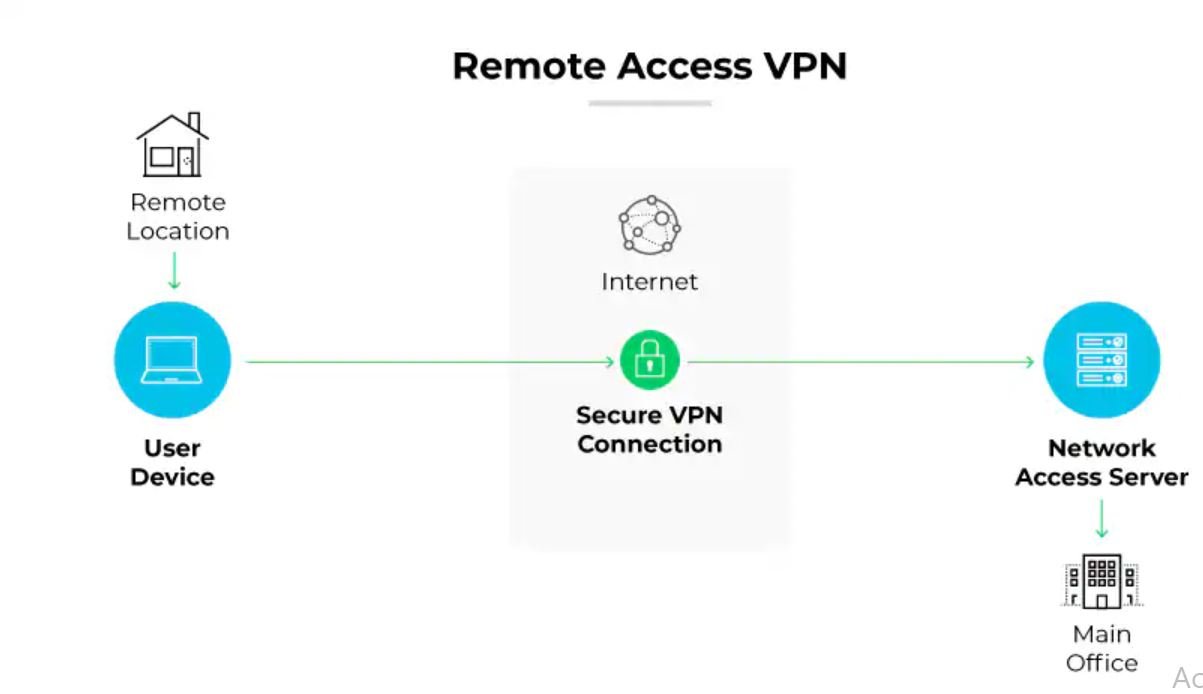
- Cisco Remote Access VPN Architecture
- Prerequisites and Lab Requirements
- Network Topology
- Step-by-Step Configuration
- Real-World Enterprise Case Study
- Verification and Testing
- Troubleshooting Common Issues
- Best Practices
- Security Considerations
- Performance Optimization
Why Remote Access VPN Matters
With hybrid workforces now the standard, employees connect to ERP systems, Active Directory, and cloud applications from home networks, hotels, and client sites — environments with no inherent security controls. Without a properly deployed VPN, that traffic travels over unencrypted public internet. Regulatory frameworks including PCI-DSS, HIPAA, ISO 27001, and Pakistan’s PECA require encryption of data in transit, making VPN a compliance requirement as much as a security measure.
Cisco ASA and IOS remain the market leaders in enterprise VPN deployments, backed by AnyConnect Secure Mobility Client — the most widely used enterprise VPN client globally.
Cisco Remote Access VPN Architecture
AnyConnect IKEv2 (Recommended)
The gold standard for enterprise deployments. Delivers AES-256 encryption, fast reconnection after network changes (MOBIKE), and full integration with Cisco ISE for endpoint posture assessment. Requires AnyConnect Plus or Apex license on the ASA.
AnyConnect SSL VPN (WebVPN)
Operates over TLS on TCP 443 — highly firewall-friendly since port 443 is open in virtually every network. Supports both full-tunnel AnyConnect client and a clientless browser portal for contractor access to internal web apps without requiring a client install.
Cisco IOS FlexVPN / EasyVPN
FlexVPN with IKEv2 is the modern IOS approach. EasyVPN is legacy — found in older deployments but being replaced. Configuration knowledge is still relevant for maintaining inherited infrastructure.
Key Components
- Cisco ASA or IOS Router: VPN headend terminating remote access connections
- Cisco AnyConnect Client: Software on end-user devices (Windows, macOS, Linux, iOS, Android)
- AAA Server (RADIUS/LDAP): Active Directory or Cisco ISE for user authentication
- IP Address Pool: Dedicated subnet assigned to VPN clients
- Group Policy: Defines tunnel parameters, DNS, split tunneling, and access rules
- Trustpoint/Certificate: SSL certificate for AnyConnect portal and IKEv2 authentication
Prerequisites and Lab Requirements
- Cisco ASA 5505/5506/5508/5516 (physical) or ASAv in VMware/EVE-NG/GNS3
- Cisco IOS Router (ISR 4000 series or CSR 1000v for virtual labs)
- Cisco ASA OS 9.8+ (9.16+ recommended for IKEv2 AnyConnect)
- Cisco IOS 15.4(2)T or later for FlexVPN/IKEv2
- Cisco AnyConnect Secure Mobility Client 4.10 or later
- AnyConnect Plus or Apex License
- Static public IP on the outside interface
- Firewall rules permitting TCP 443 (SSL VPN) and UDP 500/4500 (IKEv2) inbound
Network Topology
Internet
    |
[Cisco ASA / IOS VPN Headend]
  Outside Interface: 203.0.113.10 (Public IP)
  Inside Interface:  192.168.1.1/24 (Corporate LAN)
    |
    |--- Corporate LAN: 192.168.1.0/24
    |      Active Directory: 192.168.1.10
    |      File Server:      192.168.1.20
    |
    |--- AnyConnect VPN Pool: 172.16.50.0/24
Step-by-Step Configuration
Phase 1: Cisco ASA — AnyConnect IKEv2
Step 1: Enable AnyConnect and IKEv2
conf t

webvpn
 enable outside
 anyconnect enable
 anyconnect image disk0:/anyconnect-win-4.10.xx-k9.pkg 1
 anyconnect image disk0:/anyconnect-macosx-4.10.xx-k9.pkg 2

crypto ikev2 enable outside
Step 2: Create IP Address Pool
ip local pool ANYCONNECT-POOL 172.16.50.2 172.16.50.254 mask 255.255.255.0
Step 3: Configure IKEv2 Proposal and Policy
crypto ikev2 proposal ANYCONNECT-PROPOSAL
 encryption aes-256
 integrity sha256
 group 14

crypto ikev2 policy 10
 proposal ANYCONNECT-PROPOSAL
Step 4: Configure AAA Authentication
aaa authentication login ANYCONNECT-AAA local

! Local users (lab)
username vpnuser1 password Str0ngP@ss!2026 privilege 0

! Active Directory via RADIUS (production)
! aaa-server AD-RADIUS protocol radius
!  aaa-server AD-RADIUS (inside) host 192.168.1.10
!   key RadiusSharedSecret2026
! aaa authentication login ANYCONNECT-AAA server-group AD-RADIUS LOCAL
Step 5: Create Group Policy
group-policy ANYCONNECT-POLICY internal
group-policy ANYCONNECT-POLICY attributes
 vpn-tunnel-protocol ikev2 ssl-client
 dns-server value 192.168.1.10
 default-domain value yourdomain.local
 split-tunnel-policy tunnelspecified
 split-tunnel-network-list value SPLIT-TUNNEL-ACL
 vpn-session-timeout 480
 vpn-idle-timeout 30
 address-pools value ANYCONNECT-POOL

access-list SPLIT-TUNNEL-ACL standard permit 192.168.1.0 255.255.255.0
access-list SPLIT-TUNNEL-ACL standard permit 10.10.10.0 255.255.255.0
Step 6: Create Tunnel Group
tunnel-group ANYCONNECT-USERS type remote-access
tunnel-group ANYCONNECT-USERS general-attributes
 address-pool ANYCONNECT-POOL
 authentication-server-group ANYCONNECT-AAA
 default-group-policy ANYCONNECT-POLICY

tunnel-group ANYCONNECT-USERS webvpn-attributes
 group-alias "Corporate VPN" enable
Step 7: Configure SSL Certificate (Lab: Self-Signed)
crypto key generate rsa label ANYCONNECT-KEY modulus 2048

crypto ca trustpoint ANYCONNECT-CERT
 enrollment self
 subject-name CN=vpn.yourdomain.com,O=YourCompany,C=PK
 keypair ANYCONNECT-KEY

crypto ca enroll ANYCONNECT-CERT noconfirm
ssl trust-point ANYCONNECT-CERT outside
Step 8: Configure NAT Exemption (Critical)
This is the most common misconfiguration — without it, VPN traffic gets NATed before hitting the inside network and routing breaks.
object network VPN-POOL
 subnet 172.16.50.0 255.255.255.0

object network INSIDE-LAN
 subnet 192.168.1.0 255.255.255.0

nat (inside,outside) source static INSIDE-LAN INSIDE-LAN destination static VPN-POOL VPN-POOL no-proxy-arp route-lookup
Step 9: Allow VPN Traffic Through ASA
access-list OUTSIDE-IN extended permit ip 172.16.50.0 255.255.255.0 192.168.1.0 255.255.255.0
access-group OUTSIDE-IN in interface outside
sysopt connection permit-vpn
Step 10: Save Configuration
write memory

show webvpn anyconnect
show run group-policy ANYCONNECT-POLICY
Phase 2: Cisco ASA — Clientless SSL WebVPN
webvpn
 enable outside
 http-headers
  x-content-type-options nosniff
  x-xss-protection 1; mode=block
  strict-transport-security max-age=31536000

webvpn
 url-list INTERNAL-APPS
  heading "Corporate Applications"
  webvpn-url description "Intranet" value "https://192.168.1.50/intranet"
  webvpn-url description "HR Portal" value "https://192.168.1.60/hr"
Phase 3: Cisco IOS — FlexVPN IKEv2
! IKEv2 authorization policy
crypto ikev2 authorization policy FLEX-AUTH-POLICY
 pool FLEX-VPN-POOL
 dns 192.168.1.10
 split-tunnel included 192.168.1.0 255.255.255.0
 def-domain yourdomain.local

! IKEv2 proposal and policy
crypto ikev2 proposal FLEX-PROPOSAL
 encryption aes-cbc-256
 integrity sha256
 group 14

crypto ikev2 policy 10
 proposal FLEX-PROPOSAL

! Virtual template interface
ip local pool FLEX-VPN-POOL 172.16.50.2 172.16.50.254

interface Virtual-Template1 type tunnel
 ip unnumbered GigabitEthernet0/0
 ip mtu 1400
 ip tcp adjust-mss 1360
 tunnel mode ipsec ipv4
 tunnel protection ipsec profile FLEX-IPSEC-PROFILE

crypto ipsec profile FLEX-IPSEC-PROFILE
 set ikev2-profile FLEX-PROFILE
Real-World Enterprise Case Study: Regional Bank
Situation: A regional bank in Lahore with 800 employees and 12 branches needed to replace legacy Cisco EasyVPN. The old solution was incompatible with Windows 11 and couldn’t enforce device posture (antivirus/disk encryption checks before granting access). The requirement: 300 concurrent AnyConnect users with full ISE posture assessment, compliant with State Bank of Pakistan regulations.
Architecture deployed: Cisco ASA 5516-X active/standby HA pair at headquarters, secondary ASA pair at DR site, AnyConnect IKEv2 with Cisco ISE RADIUS integration.
Implementation timeline: Week 1-2: assessment + ASA installation. Week 3: AnyConnect IKEv2 + CA certificate. Week 4: ISE posture policies (antivirus + BitLocker checks). Week 5: IT pilot (30 users). Week 6: full rollout, legacy EasyVPN decommission.
Results: 100% of connections now enforce device posture. VPN availability improved from 97.2% to 99.98%. Connection time dropped from 35 seconds (legacy) to under 6 seconds. State Bank of Pakistan compliance audit passed with zero VPN findings. Support tickets reduced 68%.
Key lesson: NAT exemption was the top error source during testing. Always verify NAT policy before moving to authentication troubleshooting. Split-tunnel ACLs must be reviewed with application owners before go-live.
Verification and Testing
! Verify active AnyConnect sessions
show vpn-sessiondb anyconnect

! Detailed session for a specific user
show vpn-sessiondb detail anyconnect filter name vpnuser1

! Verify IKEv2 SAs
show crypto ikev2 sa detail

! Check NAT exemption hits
show nat detail

! Test from AnyConnect client after connecting
ping 192.168.1.10
nslookup fileserver.yourdomain.local 192.168.1.10

! Cisco IOS FlexVPN
show interfaces virtual-access brief
show crypto ikev2 session detail
Troubleshooting Common Issues
Issue 1: “Unable to Establish VPN” — No IKEv2 SA
Causes: TCP 443 or UDP 500/4500 blocked by ISP/firewall; AnyConnect image not loaded; outside interface not enabled for WebVPN.
show run webvpn
dir disk0: | include anyconnect
debug crypto ikev2 protocol 5

! Ensure ports are permitted
access-list OUTSIDE-IN extended permit tcp any host 203.0.113.10 eq 443
access-list OUTSIDE-IN extended permit udp any host 203.0.113.10 eq 4500
access-list OUTSIDE-IN extended permit udp any host 203.0.113.10 eq 500
Issue 2: Authentication Failure — “Login Failed”
debug aaa authentication
test aaa-server authentication ANYCONNECT-AAA username vpnuser1 password Str0ngP@ss!2026
show run username
Issue 3: Connected but Cannot Reach Inside Hosts
Check NAT exemption first — this is the #1 cause of this symptom.
show nat detail | include 172.16.50
show access-list SPLIT-TUNNEL-ACL
show route inside

! Fix: Add missing subnet to split-tunnel ACL
access-list SPLIT-TUNNEL-ACL standard permit 192.168.1.0 255.255.255.0
Issue 4: Session Drops Every 5-20 Minutes
show run group-policy ANYCONNECT-POLICY | include timeout

! Increase timeouts
group-policy ANYCONNECT-POLICY attributes
 vpn-idle-timeout 30
 vpn-session-timeout 480

crypto ikev2 profile ANYCONNECT-USERS
 dpd 30 3 on-demand
Issue 5: All Traffic Going Through VPN (Split Tunnel Not Working)
show run group-policy ANYCONNECT-POLICY | include split-tunnel

! Fix
group-policy ANYCONNECT-POLICY attributes
 split-tunnel-policy tunnelspecified
 split-tunnel-network-list value SPLIT-TUNNEL-ACL
Best Practices
- Use AnyConnect IKEv2 — retire EasyVPN, L2TP/IPsec, and PPTP
- Enforce MFA — Cisco Duo, Azure AD MFA, or RSA via RADIUS; password-only is insufficient
- Deploy ASA in Active/Standby HA — eliminates single point of failure, failover under 10 seconds
- Use CA-signed certificates in production — self-signed certs train users to click through security warnings
- Implement device posture with Cisco ISE — check antivirus, OS patches, disk encryption before granting access
- Separate tunnel groups by user type — employees, contractors, and admins get different group policies and ACLs
- Monitor with SIEM — alert on unusual login geography, concurrent sessions, and after-hours access
- Rotate PSKs and certificates on schedule — 90-day PSK rotation, 12-month certificate renewal
- Version-control configurations — maintain ASA configs in Git or Ansible for change management
Security Considerations
Use AES-256-GCM encryption, SHA-256 integrity, and DH Group 14+ minimum. Disable DES, 3DES, RC4, MD5, and DH Groups 1 and 2. Don’t grant VPN clients unrestricted access to all subnets — use granular ASA ACLs per user group. Forward ASA syslog to a SIEM and alert on brute-force attempts, geographic anomalies, and simultaneous sessions from the same username.
Performance Optimization
! TCP MSS adjustment to prevent fragmentation
sysopt connection tcpmss 1360

! Enable DTLS (UDP transport) for lower latency with VoIP/video
webvpn
 dtls port 443
group-policy ANYCONNECT-POLICY attributes
 webvpn
  dtls enable
ASA 5506-X supports up to 50 AnyConnect sessions; 5516-X supports 300. Size appropriately for peak concurrent users.
Conclusion
The most reliable Cisco remote access VPN deployments share four things: AnyConnect IKEv2 with MFA enforced, correct NAT exemption, carefully scoped split-tunnel ACLs, and active monitoring via SIEM. Get those four right and you’ll handle 95% of issues before users notice them. For the other 5%, the troubleshooting section above gives you the exact commands and fixes for every common scenario.
Related guides: Azure VPN Gateway Configuration | No Internet After VPN Connect
Professional Consulting Services
Need expert help with Cisco VPN deployment, ASA HA configuration, or Cisco ISE integration? I provide professional Cisco networking consulting and deployment services worldwide.
Contact: itexpert@navedalam.com | WhatsApp: +92 311 935 8005 | Free 30-minute consultation
About the Author
Naveed Alam is a Network & Cloud Engineer specializing in Cisco ASA, IOS, and enterprise VPN architecture. CCNA, AZ-900, Fortinet NSE 4, and CompTIA A+ certified. Has delivered 50+ network infrastructure projects for banking, healthcare, manufacturing, and government organizations across Pakistan and internationally.