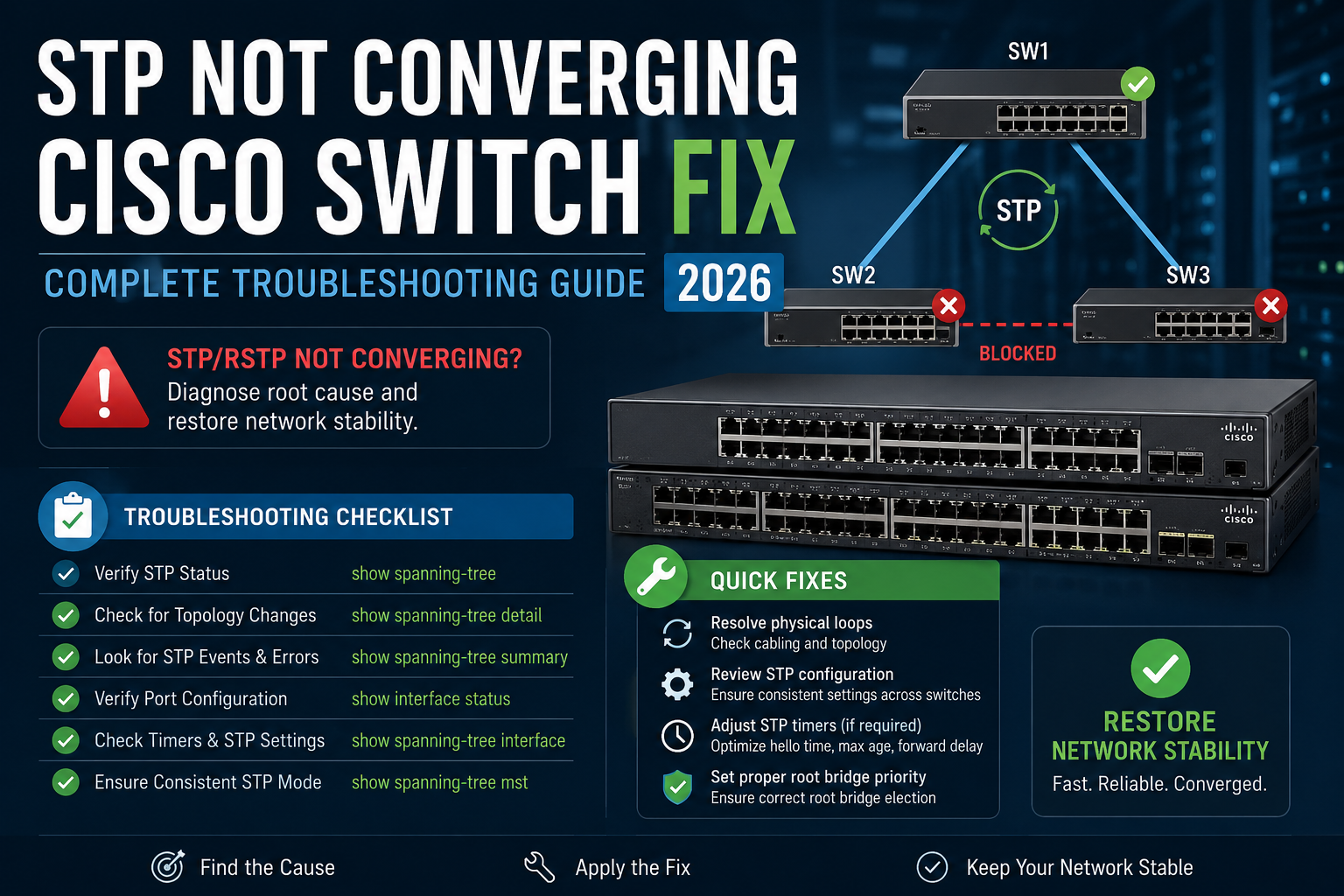

show spanning-tree detail to identify the root bridge, port states, and TCN count — then apply PortFast, BPDU Guard, and Root Guard at the correct boundaries.Table of Contents
- Why STP Convergence Failures Are Network-Critical Events
- Understanding STP and RSTP Architecture
- Prerequisites and Affected Platforms
- Step-by-Step Diagnostic and Fix Guide
- STP vs RSTP vs MSTP — Convergence Comparison
- Real-World Case Study: Broadcast Storm in a Distribution Layer
- Verification and Testing
- Troubleshooting Common Issues
- Best Practices
- Security Considerations
- People Also Ask — FAQ
- Conclusion
Why STP Convergence Failures Are Network-Critical Events
STP not converging on a Cisco switch is not a minor inconvenience — it is a Severity 1 network event. When Spanning Tree Protocol fails to elect a stable root bridge or leaves ports oscillating between states, the result is a broadcast storm that saturates every port in the Layer 2 domain within seconds. We have seen environments with Cisco Catalyst 9300 stacks lose connectivity across entire floors of a building within 8 seconds of a misconfigured uplink coming online.
The impact is immediate and total: switch CPU hits 100%, MAC address tables flood and flush continuously, VoIP calls drop, and any stateful application — Active Directory authentication, database connections, ERP sessions — fails simultaneously. To anyone watching the monitoring dashboard, it looks like every device on the network died at once.
The root cause is almost never exotic. In our experience across dozens of enterprise Cisco deployments, STP convergence failures trace back to one of five mistakes: a missing PortFast configuration on access ports, an unintended root bridge election caused by a new switch with a low MAC address, a duplex mismatch generating continuous TCNs, a missing BPDU Guard on edge ports, or a loop introduced by an unmanaged switch plugged in by an end user.
This guide walks through the complete diagnostic and fix procedure for Cisco Catalyst 2960, 3750, 3850, and 9300 series switches running IOS 15.x and IOS-XE, covering PVST+, Rapid PVST+, and MSTP environments.
Understanding STP and RSTP Architecture
Spanning Tree Protocol (802.1D) and its successor Rapid STP (802.1W) exist to prevent Layer 2 loops in switched networks while maintaining a loop-free logical topology. Understanding the election process is essential before you can diagnose why convergence is failing.
Key Components
- Root Bridge: The switch with the lowest Bridge ID (priority + MAC address) becomes root. All other switches calculate shortest paths to root.
- Bridge Protocol Data Units (BPDUs): Hello messages sent every 2 seconds. If BPDUs stop arriving on a port, STP assumes a topology change.
- Port Roles: Root Port (best path to root), Designated Port (best port on a segment toward root), Blocked/Alternate/Backup (loop prevention).
- Port States (802.1D): Blocking → Listening (15s) → Learning (15s) → Forwarding. Total: 30 seconds minimum.
- Port States (802.1W RSTP): Discarding → Learning → Forwarding. Converges in 1–2 seconds using proposal/agreement handshake.
- Topology Change Notification (TCN): When a port transitions, TCNs cause all switches to flush their MAC tables — flooding traffic until tables rebuild.
Network Topology Reference
Core Switch (Root Bridge — Priority 4096)
        |
        | Trunk (Gi0/1)
        |
Distribution Switch (Priority 8192)
      /
Gi0/2            Gi0/3
(DP)             (DP)
  |                 |
Access Sw A     Access Sw B
(Gi0/1 = RP)    (Gi0/1 = RP)
  |                 |
[End Devices]  [End Devices]
Access ports: PortFast + BPDU Guard enabled
Uplinks: Root Guard on distribution, Loop Guard on access uplinks
How RSTP Proposal/Agreement Works
RSTP achieves fast convergence by replacing the 802.1D timer-based approach with an active negotiation. When a link comes up, the upstream switch sends a Proposal BPDU. The downstream switch responds with an Agreement, immediately moving its root port to Forwarding — no 30-second wait. This only works on point-to-point full-duplex links. A half-duplex link forces RSTP to fall back to 802.1D behaviour, which is why a duplex mismatch causes the 30-second convergence symptom.
Prerequisites and Affected Platforms
- Affected hardware: Cisco Catalyst 2960, 2960X, 3750, 3750X, 3850, 9200, 9300, 9400 series
- Affected IOS versions: IOS 15.0(2) and later, IOS-XE 16.x and 17.x
- STP mode in scope: PVST+ (default), Rapid PVST+ (recommended), MSTP (multi-instance environments)
- Access required: Privileged EXEC mode on all switches in the affected L2 domain
- Console or SSH access: Required — if the network is down, you may need out-of-band console access
- Topology documentation: Know which switch should be root before you start
Step-by-Step Diagnostic and Fix Guide
Phase 1: Identify the Scope — Is STP Actually the Problem?
Before touching STP configuration, confirm that STP is the actual cause. A broadcast storm has a specific signature on Cisco switches.
! Check interface counters for broadcast saturation
show interfaces | include line|broadcast|input rate

! Check switch CPU — STP storm drives CPU to 100%
show processes cpu sorted | head 20

! Confirm STP is running and check mode
show spanning-tree summary

! Expected output if STP is healthy:
! Switch is in rapid-pvst mode
! Root bridge for: VLAN0001, VLAN0010
! Name                   Blocking Listening Learning Forwarding STP Active
! ---------------------- -------- --------- -------- ---------- ----------
! 2 vlans                       0         0        0          4          4
Common mistake here: Admins often reload switches during a broadcast storm, which temporarily clears it — but the root cause remains and the storm returns within minutes of the switch reconverging.
Phase 2: Identify the Current Root Bridge
! Run on every switch in the domain — identify who is root
show spanning-tree vlan 1

! Look for "This bridge is the root" or the root bridge MAC/priority
! Key fields:
! Root ID    Priority    4096        (lower = preferred)
!            Address     aabb.cc00.0100
!            This bridge is the root

! If an unexpected switch is root:
show spanning-tree vlan 1 detail | include Root ID|Bridge ID|port
Verification: The root bridge should be your core or distribution switch — never an access switch. If an access switch shows “This bridge is the root,” you have an incorrect root bridge election, which is one of the primary causes of STP not converging correctly across the domain.
Phase 3: Fix Root Bridge Election
! On your INTENDED root bridge (core/distribution switch):
! Method 1 — Explicit priority (recommended — deterministic)
spanning-tree vlan 1-4094 priority 4096

! Method 2 — Macro (sets primary and secondary automatically)
spanning-tree vlan 1 root primary
spanning-tree vlan 1 root secondary   ! On your backup switch

! Verify immediately
show spanning-tree vlan 1 | include Root ID|This bridge

! Expected output:
! Root ID    Priority    4096
!            Address     aabb.cc00.0100
!            This bridge is the root
!            Hello Time   2 sec  Max Age 20 sec  Forward Delay 15 sec
Phase 4: Enable Rapid PVST+ and Fix Convergence Mode
! Check current mode
show spanning-tree summary | include mode

! Switch to Rapid PVST+ (all switches in domain — do this during maintenance)
spanning-tree mode rapid-pvst

! Verify convergence behaviour
show spanning-tree vlan 1 detail | include Number of topology

! If topology change count is climbing rapidly — you have a TCN loop
! Look for the port generating TCNs:
show spanning-tree detail | include ieee|from|occurring|sent
Phase 5: Configure PortFast and BPDU Guard on Access Ports
This is the most common fix for the “RSTP taking 30 seconds” symptom. Every access port connected to an end device must have PortFast enabled — otherwise each port goes through the full Listening/Learning cycle and generates a TCN on every link-up event.
! Apply PortFast and BPDU Guard globally (safest approach)
spanning-tree portfast default
spanning-tree portfast bpduguard default

! Or per-interface (for selective application)
interface GigabitEthernet0/1
 spanning-tree portfast
 spanning-tree bpduguard enable

! Verify PortFast status
show spanning-tree interface GigabitEthernet0/1 portfast
! Expected: BPDU Guard is enabled on the interface

! Verify BPDU Guard is active
show spanning-tree summary | include BPDU Guard
Common mistake here: Never enable PortFast on trunk ports or uplinks. If a switch is connected to a PortFast-enabled port and sends a BPDU, the port shuts down immediately (BPDU Guard). This is the correct behaviour for access ports, but catastrophic if applied to an uplink.
Phase 6: Apply Root Guard and Loop Guard on Uplinks
! Root Guard — prevents any downstream switch from becoming root
! Apply on designated ports facing access layer
interface GigabitEthernet0/2
 spanning-tree guard root

! Loop Guard — prevents Alternate ports from becoming Designated
! if BPDUs stop arriving (prevents unidirectional link loops)
interface GigabitEthernet0/1
 spanning-tree guard loop

! Verify guard status
show spanning-tree inconsistentports
! If a port shows "Root Inconsistent" — a downstream switch tried to become root
! Resolution: fix the unauthorised switch priority, then:
no spanning-tree guard root   ! Temporarily, then re-enable
Phase 7: Identify and Fix Duplex Mismatch (RSTP Fallback Cause)
! Check for duplex mismatch — causes RSTP to fall back to 802.1D timing
show interfaces GigabitEthernet0/1 | include Duplex|Speed

! Both sides must show Full-duplex for RSTP proposal/agreement to work
! If one side shows Half-duplex:
interface GigabitEthernet0/1
 duplex full
 speed 1000

! Verify after change
show interfaces GigabitEthernet0/1 | include Duplex
! Expected: Full-duplex, 1000Mb/s
STP vs RSTP vs MSTP — Convergence Comparison
| Feature | STP (802.1D) | RSTP (802.1W) | MSTP (802.1s) |
|---|---|---|---|
| Convergence time | 30–50 seconds | 1–2 seconds | 1–2 seconds |
| Standard | IEEE 802.1D-1998 | IEEE 802.1W (in 802.1D-2004) | IEEE 802.1s |
| Cisco mode name | PVST+ | Rapid PVST+ | MST |
| Per-VLAN instances | Yes (one per VLAN) | Yes (one per VLAN) | Multiple VLANs per instance |
| TCN behaviour | Flush entire MAC table | Flush only affected ports | Flush only affected instance |
| Best for | Legacy only | Most enterprise environments | Large campus with 100+ VLANs |
| CPU overhead | Low | Low | Lowest (fewer instances) |
Real-World Case Study: Broadcast Storm in a Distribution Layer
A manufacturing company in Lahore with a 200-node factory floor network called us after their entire production network went down during a shift change. The symptom was classic: all switches showed 100% CPU, ping to the core switch timed out, and the help desk was flooded with calls about “internet down.”
When we connected via out-of-band console to the distribution switch, show spanning-tree summary immediately revealed the problem: an access switch in the warehouse — a Catalyst 2960 that had just been replaced that morning — had come up with the factory default priority of 32768 and a MAC address that happened to be numerically lower than the intended root bridge. It had elected itself root for VLAN 1, causing every switch in the domain to reconverge and generating thousands of TCNs per minute.
The fix took four minutes. We set the correct root bridge priority to 4096 on the core switch, applied spanning-tree portfast bpduguard default globally across all access switches, and added Root Guard to every distribution uplink facing the access layer. The network recovered immediately after the rogue switch stepped down from root.
The lesson that surprised the team: the replacement switch had been sitting in a box for two years and had never had its configuration reset from a previous installation. Always run write erase and reload before deploying a replacement switch into a production environment.
Verification and Testing
! 1. Confirm correct root bridge
show spanning-tree vlan 1 | include Root ID|This bridge

! 2. Verify all ports are in expected states
show spanning-tree vlan 1

! 3. Confirm no topology changes occurring
show spanning-tree detail | include topology change

! 4. Check BPDU Guard status
show spanning-tree summary

! 5. Verify PortFast on access ports
show spanning-tree interface GigabitEthernet0/1 detail

! 6. Monitor for 5 minutes — TCN count should not be climbing
show spanning-tree detail | include Number of topology changes
! Healthy output: Number of topology changes 3, last change 00:45:21
! Unhealthy output: Number of topology changes 2847, last change 00:00:01

! 7. Verify interfaces are stable
show interfaces status | include connected
Troubleshooting Common Issues
Issue 1: RSTP Convergence Still Taking 30 Seconds
Symptoms: Ports take 30 seconds to forward after link comes up despite Rapid PVST+ being enabled.
Root cause: Duplex mismatch on the link — RSTP falls back to 802.1D timer behaviour on half-duplex links.
! Diagnose
show interfaces GigabitEthernet0/1 | include Duplex

! Fix
interface GigabitEthernet0/1
 duplex full
 speed auto

! Verify
show spanning-tree interface GigabitEthernet0/1 detail | include link type
! Must show: Link type is point-to-point by default
Prevention: Always set duplex auto and speed auto between Cisco switches, or hard-code both ends to full-duplex at matching speeds.
Issue 2: Port Stuck in BLK/Discarding State
Symptoms: A switch port never transitions to Forwarding — devices connected to it cannot communicate.
Root cause: Port is an Alternate port blocking a loop, OR Root Guard has put it into Root Inconsistent state.
! Check why port is blocking
show spanning-tree vlan 1 detail | include Gi0/2

! Check for Root Inconsistent state
show spanning-tree inconsistentports

! If Root Inconsistent — a switch on this port tried to become root
! Fix: correct priority on that downstream switch
spanning-tree vlan 1 priority 32768   ! On the offending switch

! Port will automatically recover — no manual intervention needed
Prevention: Enable Root Guard on all downlink-facing designated ports at the distribution layer.
Issue 3: Continuous Topology Change Notifications (TCN Storm)
Symptoms: Network intermittently slow, MAC table constantly flushing, show spanning-tree detail shows topology changes every 1–2 seconds.
Root cause: An access port without PortFast is flapping (link up/down), generating TCNs that flush MAC tables domain-wide on every event.
! Find the port generating TCNs
show spanning-tree detail | include from port

! Apply PortFast to eliminate TCNs from end-device ports
interface GigabitEthernet0/5
 spanning-tree portfast
 spanning-tree bpduguard enable

! Verify flap history
show interfaces GigabitEthernet0/5 | include transitions
Prevention: Apply spanning-tree portfast default globally — it only affects access-mode ports, not trunks.
Issue 4: Broadcast Storm After New Switch Added
Symptoms: Network collapses immediately after a new switch or unmanaged switch is connected.
Root cause: Physical loop created — cables plugged into two ports of the same switch, or an unmanaged switch with no STP creating a loop.
! Identify the loop — look for ports with massive input errors
show interfaces | include input errors|line protocol

! Isolate the loop — disconnect suspect cables one at a time
! After loop is broken, clear MAC table
clear mac address-table dynamic

! Protect against future unmanaged switch loops
interface GigabitEthernet0/1
 spanning-tree portfast
 spanning-tree bpduguard enable
! BPDU Guard will shut down any port where a switch is connected
Prevention: BPDU Guard on all access ports — it shuts down any port receiving a BPDU from an unmanaged switch within seconds.
Issue 5: STP Not Running on a VLAN
Symptoms: show spanning-tree vlan X returns no output for a specific VLAN.
Root cause: VLAN does not exist in the VLAN database, or STP has been disabled per-VLAN.
! Check VLAN exists
show vlan brief | include active

! Check if STP is disabled
show spanning-tree summary | include VLAN

! Re-enable STP for a VLAN
spanning-tree vlan 10

! Verify
show spanning-tree vlan 10
Prevention: Never use no spanning-tree vlan X unless you have a fully documented loop-free topology — this removes all loop protection for that VLAN.
Best Practices
Root Bridge Design
- Always manually set the root bridge priority. Never rely on the default 32768 — any new switch added to the network can win the election and cause a topology change.
- Set a secondary root bridge. Use
spanning-tree vlan X root secondaryon your distribution switch so convergence is fast if the primary fails. - Use VLAN-based load balancing. In PVST+ environments, set even VLANs to use one uplink as root port and odd VLANs to use the other — this distributes traffic and avoids a single point of failure.
Port Configuration
- PortFast on every access port, without exception. The 30-second delay on access ports generates unnecessary TCNs and slows down device connections.
- BPDU Guard globally. Any access port receiving a BPDU should shut down immediately — this catches unmanaged switches and mispatched cables before they cause storms.
- Root Guard on all designated downlink ports. Prevents access switches from ever winning a root election regardless of their priority configuration.
- Loop Guard on uplinks. Protects against unidirectional link failures that STP cannot detect through normal BPDU timeout.
Operational Best Practices
- Document your STP topology. Know which switch is root for each VLAN before an incident occurs — not during one.
- Run Rapid PVST+ everywhere. There is no reason to run legacy PVST+ (802.1D) on any Cisco Catalyst switch deployed in the last 10 years.
- Erase configs on replacement switches. Run
write erasebefore deploying any switch that may have been used previously. - Enable SNMP traps for topology changes. Configure your NMS to alert on STP topology change events — catching a TCN storm early prevents a full broadcast storm.
Security Considerations
BPDU Guard is both a stability and security control. An attacker who connects a rogue switch to an access port can manipulate the root bridge election, redirect traffic through their device, and perform Layer 2 man-in-the-middle attacks. BPDU Guard on all access ports shuts down the port within one BPDU hello interval (2 seconds), preventing this attack vector.
Root Guard similarly prevents a compromised or misconfigured switch from winning the root bridge election and redirecting traffic flows through an unintended path.
For environments with compliance requirements (PCI-DSS, ISO 27001), document your STP topology and root bridge priority configuration as part of your network security baseline. Any topology change should trigger an alert and be investigated — unexpected topology changes are an indicator of either a physical fault or a deliberate manipulation.
People Also Ask — FAQ
Why is my RSTP convergence taking 30 seconds instead of 1–2 seconds?
RSTP convergence falls back to 802.1D’s 30-second timer when it detects a half-duplex link. The RSTP proposal/agreement mechanism only works on point-to-point full-duplex connections. Run show interfaces GigabitEthernet X/X | include Duplex — if either side shows half-duplex, fix the duplex mismatch and convergence will immediately drop to 1–2 seconds.
What causes Spanning Tree Protocol to not converge?
STP not converging is typically caused by one of five issues: an incorrect root bridge election (wrong switch winning the priority vote), missing PortFast on access ports causing continuous TCNs, a duplex mismatch disabling RSTP fast convergence, a physical loop from an unmanaged switch or miswired cable, or BPDU Guard shutting down uplinks because PortFast was incorrectly applied to trunk ports.
How do I fix a spanning tree loop on a Cisco switch?
First, identify the loop by running show interfaces | include input errors — a looped port shows massive input errors and broadcast counts. Disconnect the suspect cable to break the loop, then run clear mac address-table dynamic to flush the flooded MAC table. Once stable, enable BPDU Guard on all access ports to automatically shut down any future loop-causing connections.
What is the difference between STP and RSTP convergence time?
Standard STP (802.1D) takes 30–50 seconds to converge because ports must pass through Listening (15s) and Learning (15s) states before Forwarding. RSTP (802.1W) converges in 1–2 seconds using a proposal/agreement handshake between adjacent switches, completely bypassing the timer-based state machine — as long as the link is full-duplex point-to-point.
Related Articles
- VLAN Configuration Cisco Switch Step by Step: Complete Guide 2026 — STP runs per-VLAN in PVST+ mode; configure VLANs correctly before tuning STP per-VLAN priorities.
- Network Troubleshooting Guide: Complete & Proven Fix 2026 — STP broadcast storms present as total network outages; use this OSI-layer methodology for systematic diagnosis.
- Cisco ASA Configuration Guide 2026 — Relevant for engineers managing ASA firewalls at the access layer boundary where STP domain meets routed infrastructure.
Conclusion
STP not converging on a Cisco switch is always fixable — and it almost always traces back to a small number of configuration gaps that are straightforward to close once you know where to look. The diagnostic sequence matters: confirm the root bridge first, then check convergence mode, then address port-level configuration.
Set the root bridge manually. Never leave root bridge election to chance — one new switch with a low MAC address can destabilise your entire L2 domain.
Run Rapid PVST+ everywhere. There is no operational reason to run legacy STP on any modern Cisco Catalyst switch.
PortFast and BPDU Guard on every access port. These two commands eliminate the most common sources of TCN storms and slow convergence.
Root Guard and Loop Guard on uplinks. These protect your topology against both misconfiguration and physical failures that STP cannot detect on its own.
Document and monitor. A topology change alert configured in your NMS gives you early warning before a TCN storm becomes a broadcast storm.
Need Expert Help with Cisco Switch Configuration?
I provide professional IT consulting for businesses across Pakistan and internationally — including STP design audits, campus network builds on Cisco Catalyst, and emergency broadcast storm recovery.
- Spanning tree design and hardening
- Cisco Catalyst 2960 / 3750 / 3850 / 9300 configuration
- VLAN and inter-VLAN routing
- Campus network troubleshooting
- Network security — BPDU Guard, Root Guard, DAI, IP Source Guard
Email: itexpert@navedalam.com
WhatsApp: +92 311 935 8005
Website: navedalam.com
Free 30-minute consultation — no obligation.
About the Author — Naveed Alam
Naveed Alam is a certified Network and Cloud Engineer specialising in enterprise Cisco infrastructure, Azure cloud networking, and Microsoft 365 deployments. He holds CCNA, AZ-900, and CompTIA A+ certifications and has designed and deployed switching infrastructure for organisations ranging from 50 to 1,500+ users across Pakistan and internationally.
Specialisations: Cisco routing and switching, STP design, VLAN architecture, Azure networking, Windows Server, and cloud migrations.
LinkedIn · navedalam.com · itexpert@navedalam.com