
Introduction
Azure Standard Tier is one of the most widely used service tiers in Microsoft Azure, offering the right balance of performance, features, and cost for the majority of enterprise workloads. Whether you are deploying virtual machines, load balancers, storage accounts, or networking services, understanding Azure Standard Tier is essential for making the right infrastructure decisions in 2026. Choosing the wrong tier can lead to either overspending on capabilities you do not need or underperforming on production workloads that demand reliability and scale.
Microsoft Azure organises most of its services into tiers — Basic, Standard, and Premium — each designed for different workload requirements and budget ranges. Azure Standard Tier sits in the middle of this stack, providing production-grade SLAs, zone redundancy options, enhanced throughput, and a significantly richer feature set compared to the Basic tier. It is the recommended tier for most business-critical applications, web services, and enterprise networking infrastructure.
In this complete guide you will learn:
- What Azure Standard Tier is and how it differs from Basic and Premium
- Key features and capabilities across major Azure services
- Azure Standard Tier pricing and cost optimisation strategies
- Real-world use cases and a full enterprise case study
- Step-by-step configuration guide with Azure CLI commands
- Troubleshooting, best practices, and security considerations
Table of Contents
- Introduction
- Why Azure Standard Tier Matters for Enterprise
- Understanding Azure Standard Tier Architecture
- Azure Standard Tier Features Across Key Services
- Azure Standard Tier Pricing Overview
- Prerequisites and Planning
- Step-by-Step Azure Standard Tier Configuration Guide
- Real-World Enterprise Example
- Verification and Testing
- Troubleshooting Common Azure Standard Tier Issues
- Azure Standard Tier Best Practices
- Security Considerations
- Performance Optimization Tips
- Related Articles
- Conclusion
- Professional IT Consulting Services
- About the Author
Why Azure Standard Tier Matters for Enterprise
When designing cloud infrastructure, tier selection directly impacts availability, performance, and total cost of ownership (TCO). The Azure Standard Tier matters for enterprise workloads because it is the first tier that includes production-grade SLA guarantees, Availability Zone support, and advanced networking features that Basic simply does not offer.
Here is why most organisations choose Azure Standard Tier for their production workloads:
- SLA-backed uptime: Standard tier services include 99.95% or 99.99% SLA commitments depending on the service and redundancy configuration
- Zone redundancy: Standard Load Balancer and Standard Public IP addresses support Availability Zones, enabling active-active deployments across data centre failures
- Enterprise networking: Standard SKU is required for advanced features like cross-region load balancing, outbound rules, and HA ports on internal load balancers
- Security features: Standard Public IPs are closed to inbound traffic by default (secure by default), unlike Basic which is open
- Cost efficiency: Standard tier provides significantly more capability than Premium at a fraction of the price, making it the sweet spot for most workloads
Microsoft itself recommends Standard SKU for all new deployments. The Basic tier is being retired from several Azure services, making Standard the baseline for modern Azure architecture.
Understanding Azure Standard Tier Architecture
The Azure Standard Tier architecture is built around three core principles: redundancy, scalability, and security. Unlike the Basic tier which operates at a single data centre level, Standard tier resources are designed to operate across Availability Zones within an Azure region.
Key Components of Azure Standard Tier
- Standard Load Balancer: Layer 4 load balancer with zone-redundant frontend, support for up to 1,000 backend instances, outbound rules, and HA ports
- Standard Public IP: Static IP allocation only, zone-redundant by default, closed to inbound traffic by default (requires NSG to open)
- Standard Storage (General Purpose v2): Supports all storage services (Blob, File, Queue, Table), LRS/ZRS/GRS redundancy, tiered access (Hot, Cool, Archive)
- Standard VMs: Access to a full range of VM sizes including memory-optimised, compute-optimised, and GPU-enabled instances
- Standard Azure Kubernetes Service (AKS): Managed Kubernetes with Standard load balancer integration, autoscaling, and node pool management
- Standard Azure SQL Database: DTU-based or vCore model with up to 4TB storage, automated backups, and geo-replication
How Azure Standard Tier Works
When you deploy a resource at the Standard tier, Azure provisions it with zone-aware infrastructure under the hood. For example, a Standard Load Balancer automatically distributes traffic across backend VMs even if those VMs span multiple Availability Zones. The health probe mechanism continuously checks backend instance health and removes unhealthy instances from the rotation within seconds, ensuring high availability without manual intervention.
Azure Standard Tier Features Across Key Services
The Azure Standard Tier features vary depending on the specific Azure service. Here is a detailed breakdown of what Standard tier delivers across the most commonly used Azure services:
Standard Load Balancer
- Zone-redundant and zonal frontend IP configurations
- Up to 1,000 backend pool instances (vs 300 in Basic)
- Outbound rules for precise SNAT port control
- HA ports for internal load balancing of all protocols/ports
- HTTPS health probes
- Diagnostics with Azure Monitor metrics
- Cross-region load balancing (Global tier, built on Standard)
- SLA: 99.99%
Standard Public IP Address
- Static allocation only (no dynamic option)
- Zone-redundant by default (can be pinned to a specific zone)
- Secure by default — all inbound traffic blocked until NSG rules applied
- Supports Standard Load Balancer, Application Gateway, VPN Gateway, and NAT Gateway
- IPv6 dual-stack support
Standard Storage (General Purpose v2)
- All redundancy options: LRS, ZRS, GRS, RA-GRS, GZRS, RA-GZRS
- Blob, File, Queue, Table, and Data Lake Storage Gen2
- Lifecycle management policies for automated tiering
- Soft delete, versioning, and point-in-time restore
- Private endpoint support
- Azure Defender for Storage integration
Standard Azure SQL Database
- 10 DTUs to 3000 DTUs (Standard S0 to S12)
- Up to 250 GB storage per database (Standard tier)
- Automated backups with 35-day retention
- Active geo-replication for read scale-out
- Transparent Data Encryption (TDE) enabled by default
Azure Standard Tier Pricing Overview
Azure Standard Tier pricing is consumption-based and varies by service, region, and configuration. Below is a representative pricing summary for major Standard tier services in the East US region as of 2026:
| Service | Standard Tier Cost | Basic Tier Cost | Key Difference |
|---|---|---|---|
| Load Balancer | ~$0.025/hr + $0.005/GB | Free (limited) | Zone redundancy, SLA |
| Public IP | ~$0.005/hr | ~$0.004/hr | Zone support, secure default |
| Storage (GPv2 LRS) | ~$0.018/GB/month | ~$0.020/GB/month (v1) | More features, lower cost |
| SQL Database (S1) | ~$30/month | ~$5/month (B-series) | 20 DTUs vs 5 DTUs |
Always verify current pricing at the official Microsoft Azure Pricing Calculator as costs vary by region and are subject to change.
Prerequisites and Planning
Lab Requirements
Access Requirements:
- Active Azure subscription (Pay-As-You-Go, EA, or CSP)
- Azure account with Contributor or Owner role on the subscription
- Access to Azure Portal (portal.azure.com) or Azure CLI
Software and Tools Required:
- Azure CLI 2.50+ — Install:
winget install Microsoft.AzureCLI - PowerShell 7.x with Az module:
Install-Module -Name Az -AllowClobber - Visual Studio Code with Azure Tools extension (optional but recommended)
Planning Considerations:
- Select the Azure region closest to your users for lowest latency
- Determine redundancy requirements — ZRS for zone redundancy, GRS for geo-redundancy
- Review Microsoft’s service retirement notices — Basic Public IP and Basic Load Balancer are retiring September 2025
- Budget estimate using the Azure Pricing Calculator before deploying
Step-by-Step Azure Standard Tier Configuration Guide
Phase 1: Create a Resource Group
All Azure resources must be deployed into a resource group. This creates a logical container for your Standard tier resources and makes management, cost tracking, and deletion easier.
# Login to Azure
az login

# Set your subscription
az account set --subscription "Your-Subscription-Name"

# Create a resource group
az group create
  --name Standard-Tier-RG
  --location eastus

# Expected output:
# {
#   "id": "/subscriptions/.../resourceGroups/Standard-Tier-RG",
#   "location": "eastus",
#   "name": "Standard-Tier-RG",
#   "properties": { "provisioningState": "Succeeded" }
# }
Phase 2: Create a Standard Public IP Address
Standard Public IP addresses are required for Standard Load Balancers and provide zone redundancy. Unlike Basic IPs, Standard IPs are always static and secure by default.
# Create a zone-redundant Standard Public IP
az network public-ip create
  --resource-group Standard-Tier-RG
  --name Standard-PublicIP
  --sku Standard
  --allocation-method Static
  --zone 1 2 3

# Verify the IP was created
az network public-ip show
  --resource-group Standard-Tier-RG
  --name Standard-PublicIP
  --query "{SKU:sku.name, Allocation:publicIpAllocationMethod, Zones:zones}"
  --output table

# Expected output:
# SKU        Allocation    Zones
# Standard   Static        ['1', '2', '3']
Phase 3: Deploy a Standard Load Balancer
The Standard Load Balancer is the backbone of highly available Azure deployments. This phase creates an internet-facing Standard Load Balancer with the Public IP from Phase 2.
# Create Standard Load Balancer
az network lb create
  --resource-group Standard-Tier-RG
  --name Standard-LB
  --sku Standard
  --public-ip-address Standard-PublicIP
  --frontend-ip-name Frontend-Config
  --backend-pool-name Backend-Pool

# Add a health probe
az network lb probe create
  --resource-group Standard-Tier-RG
  --lb-name Standard-LB
  --name HTTP-Health-Probe
  --protocol Http
  --port 80
  --path "/health"

# Add a load balancing rule
az network lb rule create
  --resource-group Standard-Tier-RG
  --lb-name Standard-LB
  --name HTTP-Rule
  --protocol Tcp
  --frontend-port 80
  --backend-port 80
  --frontend-ip-name Frontend-Config
  --backend-pool-name Backend-Pool
  --probe-name HTTP-Health-Probe

# Verify Load Balancer
az network lb show
  --resource-group Standard-Tier-RG
  --name Standard-LB
  --query "{SKU:sku.name, ProvisioningState:provisioningState}"
  --output table

# Expected output:
# SKU        ProvisioningState
# Standard   Succeeded
Phase 4: Create a Standard Storage Account
General Purpose v2 is the Standard tier storage account type that supports all Azure storage services with the best pricing and feature set.
# Create a Standard GPv2 Storage Account with Zone-Redundant Storage
az storage account create
  --resource-group Standard-Tier-RG
  --name standardstorage2026
  --sku Standard_ZRS
  --kind StorageV2
  --location eastus
  --min-tls-version TLS1_2
  --allow-blob-public-access false

# Verify storage account
az storage account show
  --resource-group Standard-Tier-RG
  --name standardstorage2026
  --query "{Kind:kind, SKU:sku.name, TLS:minimumTlsVersion}"
  --output table

# Expected output:
# Kind         SKU           TLS
# StorageV2    Standard_ZRS  TLS1_2
Phase 5: Deploy a Standard Azure SQL Database
Standard SQL Database provides the performance and reliability needed for business applications without the Premium cost.
# Create SQL Server
az sql server create
  --resource-group Standard-Tier-RG
  --name standardsqlserver2026
  --location eastus
  --admin-user sqladmin
  --admin-password "SecureP@ssword2026!"

# Create Standard S2 SQL Database
az sql db create
  --resource-group Standard-Tier-RG
  --server standardsqlserver2026
  --name ProductionDB
  --edition Standard
  --service-objective S2

# Verify database
az sql db show
  --resource-group Standard-Tier-RG
  --server standardsqlserver2026
  --name ProductionDB
  --query "{Edition:edition, ServiceObjective:currentServiceObjectiveName, Status:status}"
  --output table

# Expected output:
# Edition     ServiceObjective    Status
# Standard    S2                  Online
Real-World Enterprise Example
Case Study: E-Commerce Company — 150 Employees
Company Profile:
A regional e-commerce company with 150 employees was running their web platform on Basic tier resources deployed 3 years ago. Their on-premises data centre was being decommissioned and they needed to fully migrate to Azure. The development team was experiencing frequent outages due to lack of zone redundancy and the Basic Load Balancer’s 300-instance backend limit was being hit during flash sales.
Challenge:
- Basic Load Balancer had no SLA and was causing unplanned downtime
- Basic Public IPs were open by default, creating security vulnerabilities
- Storage account was General Purpose v1 — missing lifecycle management and tiering
- SQL Database on Basic tier (5 DTUs) was throttling under normal load
- No zone redundancy — a single AZ failure would take down the entire platform
Solution — Full Migration to Azure Standard Tier:
- Replaced Basic Load Balancer with Standard Load Balancer (zone-redundant, 99.99% SLA)
- Migrated all Basic Public IPs to Standard Static IPs with NSG rules applied
- Upgraded storage from GPv1 to GPv2 Standard ZRS with lifecycle management policies
- Scaled SQL Database from Basic to Standard S3 (100 DTUs) — later moved to vCore General Purpose
- Added outbound rules to the Standard Load Balancer for predictable SNAT behaviour
Results Achieved:
- Zero unplanned downtime in 8 months following migration
- Flash sale peak traffic handled with 600 backend instances (impossible on Basic)
- SQL query response times improved by 68% with S3 vs Basic DTUs
- Storage costs reduced by 22% through lifecycle management moving older blobs to Cool tier automatically
- Security posture improved — all public IPs now closed by default with explicit NSG rules
Lessons Learned:
- Do not use Basic tier for any production workload — the lack of SLA alone justifies Standard
- Migrate Basic Public IPs before the September 2025 retirement deadline
- Lifecycle management on Standard storage pays for itself within the first month for most workloads
- Always combine Standard Load Balancer with NSGs on NICs for defence-in-depth
Verification and Testing
After deploying Azure Standard Tier resources, verify everything is working correctly with these tests:
Load Balancer Health Check
# Check Load Balancer health probe status
az network lb show
  --resource-group Standard-Tier-RG
  --name Standard-LB
  --query "backendAddressPools[0].backendIPConfigurations"

# Test connectivity to the Load Balancer frontend IP
public_ip=$(az network public-ip show
  --resource-group Standard-Tier-RG
  --name Standard-PublicIP
  --query ipAddress -o tsv)

curl -I http://$public_ip
# Expected: HTTP/1.1 200 OK
Storage Account Verification
# Test storage connectivity and confirm ZRS redundancy
az storage account show
  --resource-group Standard-Tier-RG
  --name standardstorage2026
  --query "{Replication:sku.name, HTTPSOnly:enableHttpsTrafficOnly, PublicAccess:allowBlobPublicAccess}"

# Expected:
# {
#   "Replication": "Standard_ZRS",
#   "HTTPSOnly": true,
#   "PublicAccess": false
# }
SQL Database Performance Test
# Check SQL Database current DTU usage
az sql db show
  --resource-group Standard-Tier-RG
  --server standardsqlserver2026
  --name ProductionDB
  --query "{Edition:edition, DTUCapacity:currentSku.capacity, Status:status}"
Troubleshooting Common Azure Standard Tier Issues
Issue 1: Standard Public IP — Cannot Connect Inbound
Symptoms: All inbound connections to the Standard Public IP are timing out even though the service is running.
Cause: Standard Public IPs are secure by default — all inbound traffic is blocked unless an NSG explicitly allows it. This is different from Basic IPs which are open by default.
Resolution:
# Create an NSG and allow HTTP/HTTPS inbound
az network nsg create
  --resource-group Standard-Tier-RG
  --name Standard-NSG

az network nsg rule create
  --resource-group Standard-Tier-RG
  --nsg-name Standard-NSG
  --name Allow-HTTP
  --protocol Tcp
  --direction Inbound
  --priority 100
  --source-address-prefix Internet
  --destination-port-range 80 443

# Associate NSG with subnet
az network vnet subnet update
  --resource-group Standard-Tier-RG
  --vnet-name Your-VNet
  --name Your-Subnet
  --network-security-group Standard-NSG
Issue 2: Standard Load Balancer — SNAT Port Exhaustion
Symptoms: Outbound connections from backend VMs are failing intermittently. Azure Monitor shows SNAT connection failures.
Cause: The Standard Load Balancer allocates a fixed number of SNAT ports per backend instance. High outbound connection volumes can exhaust these ports.
Resolution:
# Add a NAT Gateway to the subnet for dedicated outbound connectivity
az network nat gateway create
  --resource-group Standard-Tier-RG
  --name Standard-NAT-GW
  --public-ip-addresses Standard-PublicIP
  --idle-timeout 10

# Associate NAT Gateway with subnet
az network vnet subnet update
  --resource-group Standard-Tier-RG
  --vnet-name Your-VNet
  --name Your-Subnet
  --nat-gateway Standard-NAT-GW
Issue 3: Standard Storage — Access Denied on Blob
Symptoms: Applications receive 403 Forbidden when accessing blobs, even with correct connection strings.
Cause: Standard GPv2 storage accounts created with --allow-blob-public-access false block anonymous access. Applications must use SAS tokens or Azure AD authentication.
Resolution:
# Generate a SAS token for the container
az storage container generate-sas
  --account-name standardstorage2026
  --name mycontainer
  --permissions racwl
  --expiry 2026-12-31
  --auth-mode login
Issue 4: SQL Standard Tier — DTU Throttling
Symptoms: Application response times spike. Azure Portal shows DTU percentage consistently above 90%.
Resolution: Scale up the SQL Database service objective within Standard tier or move to General Purpose vCore model.
# Scale SQL Database from S2 to S4
az sql db update
  --resource-group Standard-Tier-RG
  --server standardsqlserver2026
  --name ProductionDB
  --service-objective S4

# Verify new service objective
az sql db show
  --resource-group Standard-Tier-RG
  --server standardsqlserver2026
  --name ProductionDB
  --query currentServiceObjectiveName
# Expected output: "S4"
Issue 5: Basic to Standard Tier Migration — IP Change
Symptoms: After upgrading from Basic to Standard Public IP, the IP address changed and DNS records are broken.
Cause: Basic dynamic IPs cannot be upgraded in place — you must create a new Standard Static IP. The IP address will be different from the old Basic IP.
Prevention: Always use Standard Static IPs from day one. Update DNS records immediately after migration and use Azure DNS zones for faster propagation.
Azure Standard Tier Best Practices
Following these best practices ensures you get maximum value from Azure Standard Tier deployments:
- Always use Standard tier for production: Never deploy production workloads on Basic tier. The lack of SLA, zone redundancy, and limited features create unacceptable risk.
- Enable zone redundancy on all Standard resources: Deploy Standard Load Balancers and Public IPs as zone-redundant (not pinned to a single zone) to survive Availability Zone failures.
- Apply NSGs immediately with Standard Public IPs: Standard IPs are secure by default — ensure your NSGs are associated with subnets or NICs before making the IP public.
- Use Standard ZRS storage for critical data: Zone-Redundant Storage (ZRS) replicates your data synchronously across three Availability Zones, providing 99.9999999999% (12 nines) durability.
- Enable soft delete and versioning on Standard storage: These features protect against accidental deletion and provide point-in-time recovery without additional cost on GPv2 accounts.
- Monitor Standard Load Balancer with Azure Monitor: Standard LB includes rich diagnostics — set up alerts for SNAT exhaustion, health probe failures, and backend availability before issues impact users.
- Use lifecycle management policies on Standard storage: Automatically move blobs from Hot to Cool to Archive based on last-modified date to reduce storage costs by up to 80% for cold data.
- Tag all Standard tier resources: Apply consistent tags (Environment, CostCenter, Application) to enable granular cost reporting and chargeback in Azure Cost Management.
- Plan Basic to Standard migration before retirement: Microsoft is retiring Basic Load Balancer and Basic Public IP in September 2025. Use Azure Migrate or the upgrade scripts provided by Microsoft.
- Use Azure Reservations for predictable Standard tier workloads: Reserved Instances for VMs and Reserved Capacity for SQL Database can reduce costs by up to 72% compared to pay-as-you-go.
Security Considerations
Security is a first-class consideration when deploying Azure Standard Tier resources. Here are the key security controls to implement:
Network Security
- Always associate NSGs with subnets hosting Standard tier VMs — Standard Public IPs block inbound by default but VMs on the same VNet can still reach each other without NSGs
- Enable DDoS Standard Protection on VNets hosting public-facing Standard Load Balancers for enterprise-grade attack mitigation
- Use Private Endpoints for Standard Storage and SQL Database to eliminate public internet exposure entirely
- Enable Azure Firewall in hub VNets to inspect and filter traffic between Standard tier workloads
Identity and Access
- Use Managed Identities for applications accessing Standard Storage and SQL — eliminates credential management entirely
- Apply RBAC with least privilege — grant Storage Blob Data Reader instead of full Storage Account Contributor where read access is sufficient
- Enable Azure AD authentication for SQL Database and disable SQL authentication where possible
Encryption and Compliance
- Standard Storage encrypts data at rest by default using 256-bit AES (SSE) — use Customer-Managed Keys (CMK) in Azure Key Vault for regulated industries
- Enforce HTTPS-only on Standard Storage accounts and minimum TLS 1.2
- Enable Transparent Data Encryption (TDE) on SQL Database — it is on by default but verify it is not disabled
- Enable Microsoft Defender for Storage and Defender for SQL for threat detection and anomaly alerts
Performance Optimization Tips
Getting maximum performance from Azure Standard Tier requires tuning at multiple layers:
- Standard Load Balancer: Use session persistence (client IP affinity) only when required — it reduces the effectiveness of load distribution. For stateless applications, keep it disabled for even distribution.
- Standard Storage: Choose the right access tier — Hot for frequently accessed data (less than 30 days), Cool for infrequently accessed (30-90 days), Archive for long-term retention. Mismatched tiers are the most common cause of unnecessary storage costs.
- SQL Standard Tier: Use elastic pools when you have multiple databases with unpredictable, non-overlapping usage patterns — shared DTUs across databases can reduce costs by 30-50% vs individual databases.
- Right-size Standard VMs: Use Azure Advisor recommendations to identify over-provisioned VMs. Many workloads on D4s v3 can be right-sized to D2s v3 without performance impact.
- Enable Accelerated Networking: For Standard tier VMs with high network throughput requirements, enable Accelerated Networking to reduce latency and CPU overhead by bypassing the host vSwitch.
- Use Azure CDN with Standard Storage: For blob content served globally, front Standard Blob Storage with Azure CDN Standard tier to dramatically reduce latency for end users worldwide.
Related Articles
Expand your Azure knowledge with these related guides on navedalam.com:
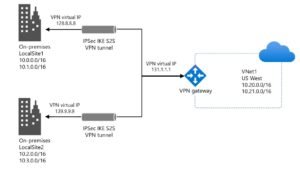
- “Azure VPN Gateway Not Connecting Fix: Complete Troubleshooting Guide“ — Essential for connecting Standard tier VNets to on-premises networks securely. Anchor text: “Azure VPN Gateway troubleshooting”
- “Azure VM Not Starting: Complete Troubleshooting Guide 2026“ — Covers Standard tier VM boot issues, disk repair, and serial console recovery. Anchor text: “Azure VM troubleshooting”
- “Azure VPN Gateway Configuration: Complete Setup Guide 2026“ — Step-by-step guide for configuring Standard tier VPN Gateways. Anchor text: “Azure VPN Gateway configuration”
- “Active Directory Replication Failed: Complete Fix Guide 2026“ — Relevant for enterprises running AD DS on Standard tier Azure VMs. Anchor text: “Active Directory fix”
Conclusion
Azure Standard Tier is the right choice for virtually every production workload on Microsoft Azure in 2026. It provides the SLA guarantees, zone redundancy, security defaults, and feature richness that modern applications demand — at a price point that makes it accessible to organisations of all sizes.
Key Takeaways:
- Standard is the baseline for production: Basic tier lacks SLAs, zone support, and key features — never use it for anything business-critical.
- Standard Public IPs are secure by default: Always attach NSGs before exposing services publicly.
- Zone redundancy is built in: Deploy Standard Load Balancers and IPs as zone-redundant to protect against Availability Zone failures automatically.
- Lifecycle management saves money: Standard GPv2 storage with lifecycle policies can reduce storage costs by up to 80% for aging data.
- Migrate from Basic before September 2025: Microsoft is retiring Basic Load Balancer and Basic Public IP — plan your migration now.
By following the step-by-step configuration guides, best practices, and security considerations in this guide, you can successfully deploy and manage Azure Standard Tier resources for your organisation with confidence, minimal risk, and maximum efficiency.
Professional IT Consulting Services
Need expert assistance with Azure Standard Tier deployment, migration from Basic to Standard, or complete Azure infrastructure design? I provide professional IT consulting and cloud deployment services for organisations across Pakistan and internationally.
Services Offered
Azure Standard Tier Planning and Deployment
- Azure infrastructure assessment and tier selection
- Basic to Standard tier migration planning and execution
- Standard Load Balancer and networking configuration
- Storage account migration and lifecycle policy setup
Cloud Infrastructure
- Azure VNet design and Standard tier networking
- Hybrid cloud connectivity (VPN Gateway, ExpressRoute)
- Azure cost optimisation and right-sizing
- Security hardening and compliance
Enterprise Networking
- Cisco routing and switching
- VPN design and deployment
- Windows Server infrastructure
- Network troubleshooting and support
Why Choose My Services?
- Proven Expertise: CCNA and Azure certified with 3+ years of enterprise experience
- Zero Downtime Guarantee: Careful planning ensures business continuity during migrations
- 24/7 Support: Available during critical deployment and migration phases
- Transparent Pricing: Clear quotes with no hidden costs
- Full Documentation: Complete handover documentation and team training
Contact Information
- Email: itexpert@navedalam.com
- WhatsApp: +92 311 935 8005
- Website: https://navedalam.com
- Location: Pakistan (Remote support worldwide)
Free Consultation: Schedule a 30-minute consultation to discuss your Azure Standard Tier requirements and receive a detailed project proposal.
About the Author
Naveed Alam is a certified Network and Cloud Engineer specialising in enterprise IT infrastructure, Microsoft Azure, and cloud networking solutions. With extensive hands-on experience across Azure Standard tier deployments, Cisco technologies, and Microsoft 365, Naveed helps organisations architect, deploy, and optimise their cloud infrastructure.
Certifications
- Cisco Certified Network Associate (CCNA)
- Microsoft Azure Fundamentals (AZ-900)
- CompTIA A+
Core Expertise
- Azure cloud networking — Standard tier design and deployment
- Microsoft 365 administration and email security
- Cisco routing, switching, and security
- VPN design and implementation (Azure and Cisco)
- Windows Server deployment and management
- PowerShell and Azure CLI automation
- Network troubleshooting and optimisation
- Enterprise IT consulting and support
Professional Experience
Naveed has successfully completed 50+ cloud infrastructure and network projects for organisations across Pakistan and internationally, ranging from SMBs to enterprises with 1,000+ users. His expertise includes Azure Standard tier migrations, hybrid network deployments, and security hardening implementations.
Connect
- LinkedIn: linkedin.com/in/navedalam
- Website: navedalam.com
- Email: itexpert@navedalam.com
Official References: