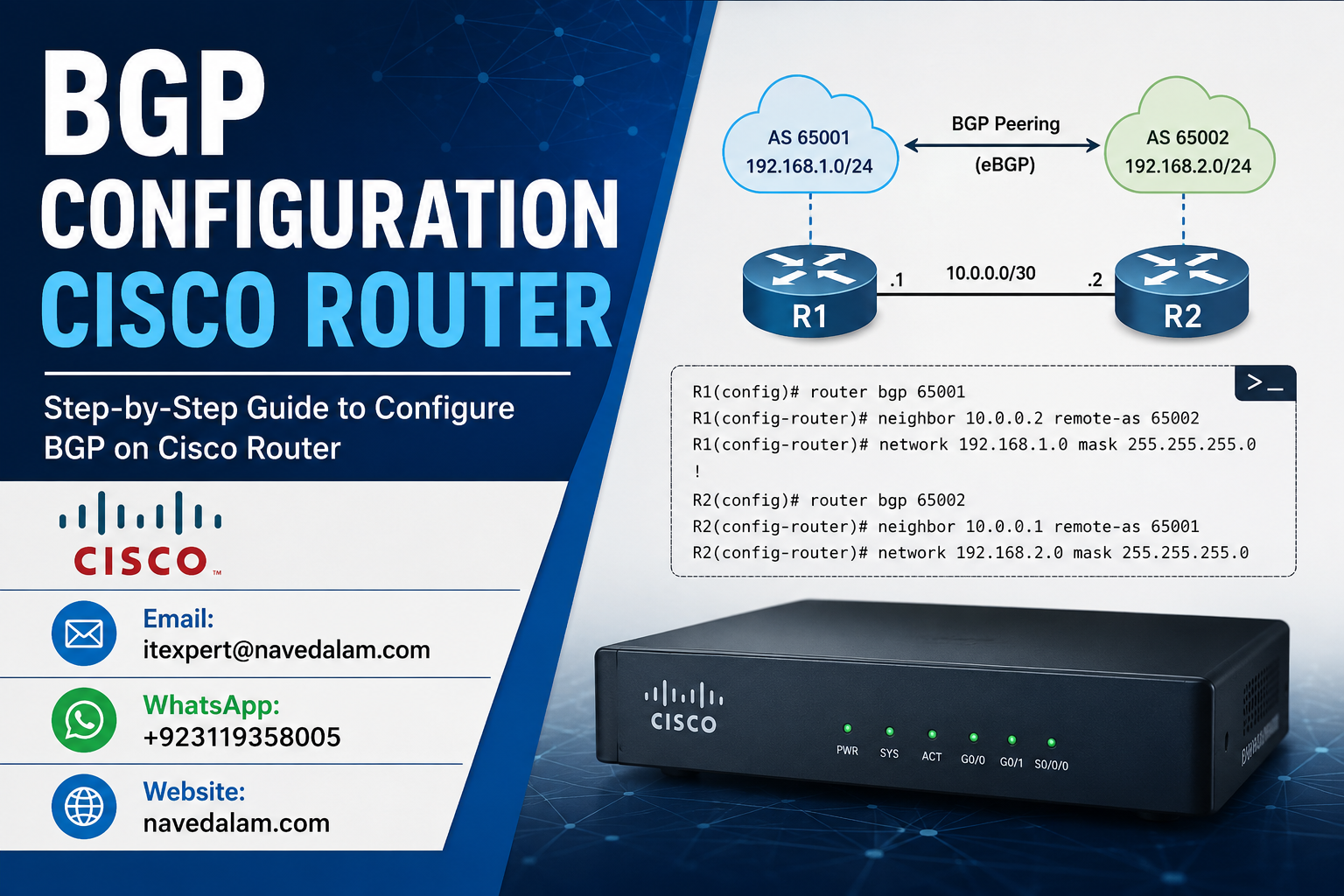

router bgp [AS-number] to create the process, neighbor [IP] remote-as [peer-AS] to define a peer, and network [prefix] mask [mask] to advertise routes. For eBGP the peer IP is a directly connected interface; for iBGP use loopback addresses with neighbor [IP] update-source Loopback0 and next-hop-self. Verify with show ip bgp summary.BGP configuration Cisco router deployments represent the step that separates campus network engineers from internet engineers. Border Gateway Protocol is the only Exterior Gateway Protocol in active use, running the routing table of the entire internet. Every ISP, cloud provider, and multi-homed enterprise relies on BGP configuration to control how traffic enters and exits their autonomous system. Yet most engineers encounter BGP for the first time under pressure — during a dual-ISP deployment or an Azure cloud migration — without a working CLI reference they can apply directly.
This guide covers BGP configuration Cisco router implementation from the ground up. You will configure eBGP peering between different autonomous systems, iBGP peering within the same AS using loopback addresses, route advertisement with the network command, prefix-list and route-map filtering, and a complete dual-ISP uplink scenario. The BGP neighbor state table from Idle to Established is covered with diagnostic meaning for each state, so you know exactly what to check when your BGP configuration Cisco router refuses to reach Established state. Whether you are preparing for CCNP or deploying production internet routing, this is the reference you work from directly.
Why BGP and When to Use It
BGP configuration on a Cisco router solves the exterior routing problem — controlling how your network exchanges reachability information with other organisations, ISPs, and cloud providers you do not own or manage. OSPF solves the interior routing problem within your own autonomous system. BGP configuration Cisco router deployments are justified in five specific scenarios: multi-homed internet connections (two or more ISPs), connecting to an MPLS provider using BGP as the PE-CE protocol, dynamic route exchange via Azure VPN Gateway with BGP enabled, internet exchange point participation, or any scenario requiring policy-based inter-AS traffic engineering.
You do not need BGP for a single-ISP connection (use a default route), for internal routing within your own infrastructure (use OSPF or EIGRP), or for basic site-to-site VPN connectivity. BGP’s operational complexity — manual neighbour configuration, TCP session management, attribute-based policy control — is only justified when you need the path control it uniquely provides.
BGP Configuration Cisco Router — Architecture and How It Works
BGP configuration on a Cisco router runs over TCP port 179. Unlike OSPF which uses multicast hellos, BGP peers must establish a full TCP connection before exchanging any routing information. IP reachability between peers must exist before BGP can form, and any firewall or ACL blocking TCP 179 silently prevents the session from ever reaching Established state.
An Autonomous System (AS) is a collection of IP prefixes under common administrative control, identified by a unique AS number. BGP peers within the same AS are iBGP neighbours. BGP peers in different AS numbers are eBGP neighbours. In any Cisco router BGP configuration: iBGP requires full mesh or route reflectors, does not increment AS-PATH, and does not modify next-hop by default (requiring next-hop-self in most designs). eBGP increments TTL to 1 by default, requiring peers to be directly connected unless ebgp-multihop is configured.
BGP Configuration Cisco Router — Lab Topology:

     ISP-A (AS 100)          ISP-B (AS 200)
     192.168.1.1              192.168.2.1
          |                        |
     Gi0/0                    Gi0/1
     +--------------------------------------------+
     |   R1 — Edge Router  AS 65001               |
     |   Gi0/0: 192.168.1.2  Gi0/1: 192.168.2.2  |
     |   Lo0: 10.255.255.1/32                     |
     +-------------------+------------------------+
                         | iBGP (AS 65001)
                    Gi0/2: 10.1.1.1
     +--------------------------------------------+
     |   R2 — Internal Router  AS 65001           |
     |   Gi0/0: 10.1.1.2  Lo0: 10.255.255.2/32   |
     +--------------------------------------------+
eBGP vs iBGP Comparison Table
Understanding the differences between eBGP and iBGP is fundamental to any BGP configuration Cisco router deployment. The table below covers the key distinctions that affect configuration commands, next-hop handling, and design decisions.
| Feature | eBGP | iBGP |
|---|---|---|
| Peer location | Different AS | Same AS |
| Default TTL | 1 (directly connected) | 255 (any reachable) |
| AS-PATH behaviour | Prepends own AS on send | Does not modify AS-PATH |
| Next-hop behaviour | Sets next-hop to own interface | Preserves original next-hop |
| next-hop-self needed? | No | Yes — almost always |
| Full mesh required? | No | Yes — or Route Reflector |
| Multi-hop for loopback? | Yes — ebgp-multihop | No — TTL 255 by default |
| Administrative distance | 20 | 200 |
BGP Neighbor States Reference
Every engineer working on BGP configuration Cisco router deployments must understand the six neighbor states. The state where a session is stuck tells you exactly what to check. This is required knowledge for both CCNP candidates and production engineers.
| State | Meaning | What to Check |
|---|---|---|
| Idle | Not attempting connection | Interface status, route to peer IP |
| Connect | TCP SYN in progress | TCP 179 reachability, ACLs |
| Active | TCP failed — retrying. Most common stuck state in Cisco router BGP configuration | IP reachability, firewall blocking 179, wrong remote-as |
| OpenSent | TCP up, OPEN message sent | AS number mismatch |
| OpenConfirm | OPEN received, sending KEEPALIVE | MD5 password mismatch |
| Established | Session fully up | Monitor prefix counts — normal operation |
Prerequisites and Lab Setup
Before starting BGP configuration on a Cisco router, verify your environment meets these requirements.
Supported hardware:
- Cisco IOS router — ISR 1100, 2900, 4000 series, or CSR1000v for lab
- Cisco IOS 15.x or IOS-XE (all BGP configuration Cisco router commands in this guide apply to both)
- IP routing enabled
Lab assumptions for this BGP configuration Cisco router guide:
- R1 Edge: AS 65001, Gi0/0 192.168.1.2/30 (ISP-A), Gi0/1 192.168.2.2/30 (ISP-B), Lo0 10.255.255.1/32
- R2 Internal: AS 65001, Gi0/0 10.1.1.2/30, Lo0 10.255.255.2/32
- ISP-A: AS 100, peer 192.168.1.1/30 | ISP-B: AS 200, peer 192.168.2.1/30
! Verify IP reachability to all BGP peers before any Cisco router BGP configuration
R1# ping 192.168.1.1
!!!!!
Success rate is 100 percent (5/5)

R1# ping 192.168.2.1
!!!!!
Success rate is 100 percent (5/5)
Step-by-Step BGP Configuration Cisco Router Guide
Follow these four phases to complete a working BGP configuration on your Cisco router. Each phase builds on the previous — verify before proceeding to the next.
Phase 1: Create the BGP Process and Configure eBGP Peer (ISP-A)
The router bgp command creates the BGP process with your autonomous system number. This is the starting point of every BGP configuration Cisco router deployment. The AS number is globally significant for eBGP — your ISP must know it to configure their side. For labs, use private AS numbers (64512–65535).
! R1 — Cisco router BGP configuration for eBGP to ISP-A (AS 100)
R1(config)# router bgp 65001
R1(config-router)# bgp router-id 10.255.255.1
R1(config-router)# neighbor 192.168.1.1 remote-as 100
R1(config-router)# neighbor 192.168.1.1 description ISP-A-PEER

! Advertise your internal prefix outbound
R1(config-router)# network 10.0.0.0 mask 255.0.0.0

! Expected syslog when session establishes:
! %BGP-5-ADJCHANGE: neighbor 192.168.1.1 Up
Verification:
R1# show ip bgp summary
BGP router identifier 10.255.255.1, local AS number 65001

Neighbor        V    AS MsgRcvd MsgSent TblVer  InQ OutQ Up/Down  State/PfxRcd
192.168.1.1     4   100      12      10      5    0    0 00:03:21        8

! State/PfxRcd = 8 = Established, receiving 8 prefixes
! Any text state (Active, Idle, Connect) = BGP configuration Cisco router not up yet
Phase 2: Add Second eBGP Peer (ISP-B)
! Add ISP-B to Cisco router BGP configuration
R1(config)# router bgp 65001
R1(config-router)# neighbor 192.168.2.1 remote-as 200
R1(config-router)# neighbor 192.168.2.1 description ISP-B-PEER

R1# show ip bgp summary
Neighbor        V    AS MsgRcvd MsgSent TblVer  InQ OutQ Up/Down  State/PfxRcd
192.168.1.1     4   100      25      18      8    0    0 00:08:14        8
192.168.2.1     4   200      19      15      8    0    0 00:05:02        6
Phase 3: Verify BGP Table and Routing Table
! Full BGP table on the Cisco router
R1# show ip bgp
Status codes: * valid, > best, i - internal

   Network          Next Hop            Metric LocPrf Weight Path
*> 0.0.0.0          192.168.1.1              0             0 100 i
*  0.0.0.0          192.168.2.1              0             0 200 i
*> 10.0.0.0         0.0.0.0                  0         32768 i

! > = best path selected | 10.0.0.0 locally originated

R1# show ip route bgp
B*   0.0.0.0/0 [20/0] via 192.168.1.1, 00:08:14
Phase 4: Set the BGP Router-ID Explicitly
Always configure the BGP router-id explicitly in every Cisco router BGP configuration. IOS auto-selects the highest IP if not set, which changes after reboots and resets all BGP sessions.
R1(config)# router bgp 65001
R1(config-router)# bgp router-id 10.255.255.1

! Soft reset — re-evaluates policies without dropping BGP sessions on the Cisco router
R1# clear ip bgp * soft

! Hard reset — drops all sessions (avoid in production during business hours)
R1# clear ip bgp *
iBGP Configuration with Loopback Addresses
iBGP peers within the same AS always use loopback addresses for peering stability in production Cisco router BGP configurations. Physical interface addresses go away when a link fails; loopbacks stay reachable as long as any IGP path exists to the router.
! R1 — iBGP BGP configuration on Cisco router using loopback
R1(config)# router bgp 65001
R1(config-router)# neighbor 10.255.255.2 remote-as 65001
R1(config-router)# neighbor 10.255.255.2 description R2-IBGP
R1(config-router)# neighbor 10.255.255.2 update-source Loopback0
R1(config-router)# neighbor 10.255.255.2 next-hop-self

! R2 — mirror configuration
R2(config)# router bgp 65001
R2(config-router)# neighbor 10.255.255.1 remote-as 65001
R2(config-router)# neighbor 10.255.255.1 description R1-IBGP
R2(config-router)# neighbor 10.255.255.1 update-source Loopback0
R2(config-router)# neighbor 10.255.255.1 next-hop-self

! OSPF must carry the loopback routes before iBGP can form
R1# show ip route 10.255.255.2
O 10.255.255.2/32 [110/2] via 10.1.1.2, GigabitEthernet0/2next-hop-self on R1 replaces the next-hop with 10.255.255.1 which R2 reaches via OSPF. Without this, iBGP BGP configuration on a Cisco router produces routes that appear in show ip bgp but are never used for forwarding.BGP Route Filtering with Prefix-Lists and Route-Maps
Route filtering is where BGP configuration Cisco router work moves from lab exercise to production engineering. Every eBGP session must have explicit inbound and outbound filters before being brought up in production.
! Prefix-list — accept only default route inbound from ISPs
R1(config)# ip prefix-list FROM-ISP-A permit 0.0.0.0/0
R1(config)# ip prefix-list FROM-ISP-A deny 0.0.0.0/0 le 32

! Prefix-list — advertise only your own prefix outbound
R1(config)# ip prefix-list TO-ISPS permit 10.0.0.0/8
R1(config)# ip prefix-list TO-ISPS deny 0.0.0.0/0 le 32

! Apply filters in Cisco router BGP configuration
R1(config)# router bgp 65001
R1(config-router)# neighbor 192.168.1.1 prefix-list FROM-ISP-A in
R1(config-router)# neighbor 192.168.1.1 prefix-list TO-ISPS out
R1(config-router)# neighbor 192.168.2.1 prefix-list FROM-ISP-A in
R1(config-router)# neighbor 192.168.2.1 prefix-list TO-ISPS out

! Soft reset to apply filters without dropping BGP sessions
R1# clear ip bgp 192.168.1.1 soft in
R1# clear ip bgp 192.168.2.1 soft in
Dual-ISP BGP Configuration — Path Preference with Local-Preference
With two default routes from a dual-ISP BGP configuration on a Cisco router, use local-preference to control which path is preferred. Higher local-preference = preferred path.
! Route-maps for dual-ISP BGP configuration on Cisco router
R1(config)# route-map PREFER-ISPA permit 10
R1(config-route-map)# set local-preference 200

R1(config)# route-map PREFER-ISPB permit 10
R1(config-route-map)# set local-preference 100

R1(config)# router bgp 65001
R1(config-router)# neighbor 192.168.1.1 route-map PREFER-ISPA in
R1(config-router)# neighbor 192.168.2.1 route-map PREFER-ISPB in

R1# clear ip bgp * soft in

! Verify — ISP-A is now preferred (LocPrf 200 vs 100)
R1# show ip bgp
*> 0.0.0.0  192.168.1.1   0   200   0  100 i
*  0.0.0.0  192.168.2.1   0   100   0  200 i
Verification Commands Explained
! Primary BGP verification on any Cisco router
R1# show ip bgp summary

! Full BGP table with path attributes and best-path indicators
R1# show ip bgp

! Specific prefix — why it was selected as best path
R1# show ip bgp 0.0.0.0

! Detailed BGP neighbor information including hold timers
R1# show ip bgp neighbors 192.168.1.1

! Routes being advertised TO a specific BGP peer
R1# show ip bgp neighbors 192.168.1.1 advertised-routes

! Routes RECEIVED from a peer (requires soft-reconfiguration first)
R1(config-router)# neighbor 192.168.1.1 soft-reconfiguration inbound
R1# show ip bgp neighbors 192.168.1.1 received-routes

! BGP routes installed in the IP routing table
R1# show ip route bgp

! Verify TCP 179 session is active
R1# show tcp brief | include 179
...  192.168.1.2.179  192.168.1.1.52431  ESTAB
Real-World Case Study
A growing e-commerce firm in Karachi came to us after their primary ISP suffered three outages in a single month. Their Cisco ISR 4331 had one ISP and a static default route. Each outage cost approximately PKR 80,000 in lost transactions and customer support overhead.
We implemented dual-ISP BGP configuration on the Cisco router using both WAN interfaces. ISP-A provided 100 Mbps fibre as primary (local-preference 200); ISP-B provided 50 Mbps LTE as backup (local-preference 100). Prefix-lists filtered inbound traffic to default routes only and outbound traffic to the client’s own /24 block, preventing any transit AS exposure.
After the BGP configuration Cisco router change, the next ISP-A outage caused automatic failover to ISP-B in under 90 seconds — the BGP hold-timer expiry. Traffic resumed within two minutes compared to 45+ minutes of manual intervention previously. The lesson learned: the LTE ISP’s BGP session took 4 minutes to reach Established state because the LTE modem’s NAT was translating TCP 179. Always verify TCP 179 connectivity with telnet [peer-IP] 179 before expecting any BGP configuration Cisco router session to form.
Troubleshooting BGP Configuration Cisco Router Issues
BGP configuration Cisco router failures fall into five categories. The first two cover 85% of all production issues.
Issue 1: BGP Neighbor Stuck in Active State
Symptoms: show ip bgp summary shows Active state indefinitely on the Cisco router.
Root cause: TCP connection failing — unreachable peer IP, firewall blocking TCP 179, or incorrect remote-as.
! Diagnose Active state in BGP configuration on Cisco router

! Step 1: IP reachability to peer
R1# ping 192.168.1.1 source GigabitEthernet0/0

! Step 2: TCP 179 not blocked
R1# telnet 192.168.1.1 179

! Step 3: Verify remote-as is correct
R1# show ip bgp neighbors 192.168.1.1 | include remote AS

! Fix — correct the remote-as in BGP configuration
R1(config)# router bgp 65001
R1(config-router)# no neighbor 192.168.1.1 remote-as 100
R1(config-router)# neighbor 192.168.1.1 remote-as [correct-AS]
Issue 2: BGP Established but No Routes in Routing Table
Root cause: Next-hop reachability check fails on the Cisco router. Fix with next-hop-self on iBGP sessions.
R1(config)# router bgp 65001
R1(config-router)# neighbor 10.255.255.2 next-hop-self
R1# clear ip bgp 10.255.255.2 soft
Issue 3: Prefix Not Being Advertised from Cisco Router
Root cause: The network statement in BGP configuration requires an exact match in the IP routing table.
! Confirm exact prefix in routing table
R1# show ip route 10.0.0.0
! Must show exact 10.0.0.0/8

! Fix — static null route creates the exact match needed by BGP configuration
R1(config)# ip route 10.0.0.0 255.0.0.0 Null0

R1# show ip bgp neighbors 192.168.1.1 advertised-routes | include 10.
Issue 4: BGP Session Flapping
Root cause: MTU mismatch on the WAN link causes large BGP UPDATE packets to be silently dropped on the Cisco router.
R1# ping 192.168.1.1 size 1500 df-bit
! Fail = MTU issue confirmed

R1(config)# interface GigabitEthernet0/0
R1(config-if)# ip tcp adjust-mss 1360
Issue 5: Synchronisation Blocking Route Installation
R1(config)# router bgp 65001
R1(config-router)# no synchronization
BGP Configuration Best Practices
Design and Scalability
Use loopback interfaces for all iBGP peering in every BGP configuration Cisco router deployment. Physical interface addresses disappear when a link fails. Loopbacks remain reachable through any IGP-found alternative path, making them essential for stable iBGP sessions.
Never accept a full internet table unless specifically required. A full BGP table contains 900,000+ prefixes. For most enterprise BGP configuration Cisco router deployments, accepting only default routes from each ISP provides full redundancy at a fraction of the memory and CPU cost.
Use private AS numbers (64512–65535) for internal BGP configuration. For lab testing, MPLS PE-CE, or Azure BGP dynamic routing, private AS numbers prevent conflicts with registered public ASNs and are never leaked to the public internet.
Route Policy and Filtering
Always apply outbound prefix-lists to all eBGP peers in your BGP configuration Cisco router. Without outbound filtering, your Cisco router may re-advertise received routes to other ISPs, accidentally becoming a transit AS and potentially carrying internet traffic for other networks.
Set maximum-prefix limits on all eBGP neighbors.
! Protect Cisco router BGP configuration from prefix table overflow
R1(config)# router bgp 65001
R1(config-router)# neighbor 192.168.1.1 maximum-prefix 10 80

! MD5 authentication on all eBGP sessions
R1(config-router)# neighbor 192.168.1.1 password [shared-key-agreed-with-ISP]
Operations
Always use soft-clear when testing BGP configuration Cisco router policy changes. clear ip bgp [peer] soft re-evaluates routes without dropping the TCP session. Hard resets exist for breaking changes only, not routine policy verification.
Document every BGP peer with a description and the peer’s NOC contact information. Good documentation is part of good BGP configuration. Knowing the ISP NOC contact at 3am prevents a 20-minute search during an outage.
Security Considerations
RPKI (Resource Public Key Infrastructure) allows your BGP configuration Cisco router to cryptographically verify that BGP announcements originate from the authorised AS. Enable with bgp rpki server tcp [IP] on IOS-XE to protect against BGP route hijacking.
GTSM — Generalised TTL Security Mechanism (RFC 5082). Configure neighbor [IP] ttl-security hops 1 on all directly connected eBGP peers to protect against TCP RST spoofing attacks targeting your BGP configuration.
Restrict TCP 179 to known BGP peers via ACL on every Cisco router BGP deployment:
! Protect Cisco router BGP configuration from unauthorised session attempts
R1(config)# ip access-list extended BGP-PEERS
R1(config-ext-nacl)# permit tcp host 192.168.1.1 any eq 179
R1(config-ext-nacl)# permit tcp host 192.168.2.1 any eq 179
R1(config-ext-nacl)# deny tcp any any eq 179 log
R1(config-ext-nacl)# permit ip any any

R1(config)# interface GigabitEthernet0/0
R1(config-if)# ip access-group BGP-PEERS in
FAQ — People Also Ask
What is the difference between eBGP and iBGP in Cisco?
eBGP (external BGP) is used in BGP configuration Cisco router deployments to peer with routers in different autonomous systems for internet or inter-organisation routing. iBGP (internal BGP) peers routers within the same AS to distribute externally learned routes internally. eBGP increments TTL to 1 and modifies next-hop; iBGP requires loopback-based peering, next-hop-self, and full mesh or route reflectors.
Why is my BGP neighbor stuck in Active state on a Cisco router?
Active state in a BGP configuration Cisco router deployment means the TCP connection to the peer is failing. Check in order: ping the peer IP to confirm reachability, run telnet [peer-IP] 179 to verify TCP 179 is not blocked by a firewall or ACL, and confirm remote-as matches the peer’s actual autonomous system number. These three checks resolve 90% of Active state cases in any BGP configuration Cisco router deployment.
How do I verify a BGP session is established on Cisco IOS?
Run show ip bgp summary on your Cisco router. A healthy BGP configuration shows a number in the State/PfxRcd column rather than a text state like Active or Idle. Confirm with show ip bgp neighbors [peer-IP] | include BGP state — it should return “BGP state = Established”.
What TCP port does BGP use and why?
BGP uses TCP port 179. All BGP configuration Cisco router sessions run over TCP because TCP provides reliable, ordered delivery essential for large routing tables. Any ACL, firewall, or NAT device blocking TCP 179 between Cisco router BGP peers prevents the session from ever forming.
When should I use BGP instead of OSPF for routing?
Use BGP configuration on a Cisco router when routing between different organisations or autonomous systems — multi-homed ISP connections, cloud provider peering, or MPLS PE-CE routing. Use OSPF for routing within your own infrastructure. Most enterprise networks run both: OSPF internally, BGP configuration Cisco router at the internet edge.
Related Articles
- OSPF Configuration Cisco Router Step by Step — BGP and OSPF are complementary; OSPF handles internal routing, BGP configuration handles the internet edge.
- Cisco ASA Configuration Guide — Enterprise ASA deployments sit between the BGP router and internal networks; covers firewall configuration complementing your BGP edge.
- Azure VPN Gateway Configuration — Azure VPN Gateway supports BGP configuration for dynamic route exchange over IPsec tunnels.
- Network Troubleshooting Guide 2026 — BGP session failures are diagnosed with ping, traceroute, and TCP connectivity checks covered in full here.
- EtherChannel Configuration Cisco Switch — High-availability BGP deployments use EtherChannel for redundant switch uplinks at the distribution layer.
Conclusion
BGP configuration Cisco router deployments are the gateway from campus networking to internet engineering. The protocol configures in minutes. Mastering the policy layer — which routes to accept, which to advertise, how to influence path selection, and how to protect the session from attack — is what separates a working BGP configuration from a production-grade one.
IP reachability before BGP configuration: BGP never fixes a routing problem — it requires one to be solved first. Always verify you can ping the peer IP before configuring any Cisco router BGP session. TCP 179 must also be reachable — verify with telnet [peer] 179.
Filter by default on every eBGP session in your BGP configuration Cisco router: Apply inbound and outbound prefix-lists before bringing up any eBGP peer. It is far easier to add permitted prefixes than to recover from accidentally becoming a transit AS.
next-hop-self for all iBGP: Configure it on every iBGP session in your BGP configuration without exception. Omitting it causes routes to appear in show ip bgp but never install in the routing table — a silent, confusing failure mode that wastes hours of diagnostic time.
Soft clears only in production: clear ip bgp [peer] soft is always the right command when testing BGP configuration Cisco router policy changes. Hard resets exist for breaking changes, not routine verification.
Need Expert Help with BGP Configuration on a Cisco Router?
I provide professional network design and deployment services across Pakistan and internationally. Whether you need a BGP dual-ISP design, a full Cisco router BGP configuration deployment, or emergency troubleshooting of a BGP session stuck in Active state — I can help remotely within hours.
- BGP configuration Cisco router — dual-ISP, MPLS PE-CE, Azure dynamic routing
- Cisco routing — OSPF, BGP, EIGRP, route redistribution
- Azure and AWS cloud networking
- Network troubleshooting and performance optimisation
- CCNA/CCNP lab guidance and mentoring
Email: itexpert@navedalam.com
WhatsApp: +92 311 935 8005
Website: navedalam.com
Free 30-minute consultation — no obligation.
Naveed Alam is a certified Network and Cloud Engineer specialising in BGP configuration Cisco router deployments, enterprise routing and switching infrastructure, and Azure cloud networking for organisations across Pakistan and internationally. He holds CCNA, AZ-900, and CompTIA A+ certifications and has completed 50+ network infrastructure projects including dual-ISP BGP deployments, MPLS migrations, and Azure hybrid connectivity implementations.
LinkedIn · navedalam.com · itexpert@navedalam.com